









Blog
AI GEN XII EA MT4 – Full Input Settings Analysis

AI Gen XII EA is an Expert Advisor based on trading realities and neural networks. To use it on MetaTrader, you will need to permit WebRequest for indexed URLs and add some URLs. The EA is optimized on the XAUUSD (GOLD) and M30 timeframe with a minimum deposit of $100. The EA is compatible with any type of account, trying to provide precise, efficient, and profitable trading with good risk management.
Buy AI GEN XII EA MT4 product here
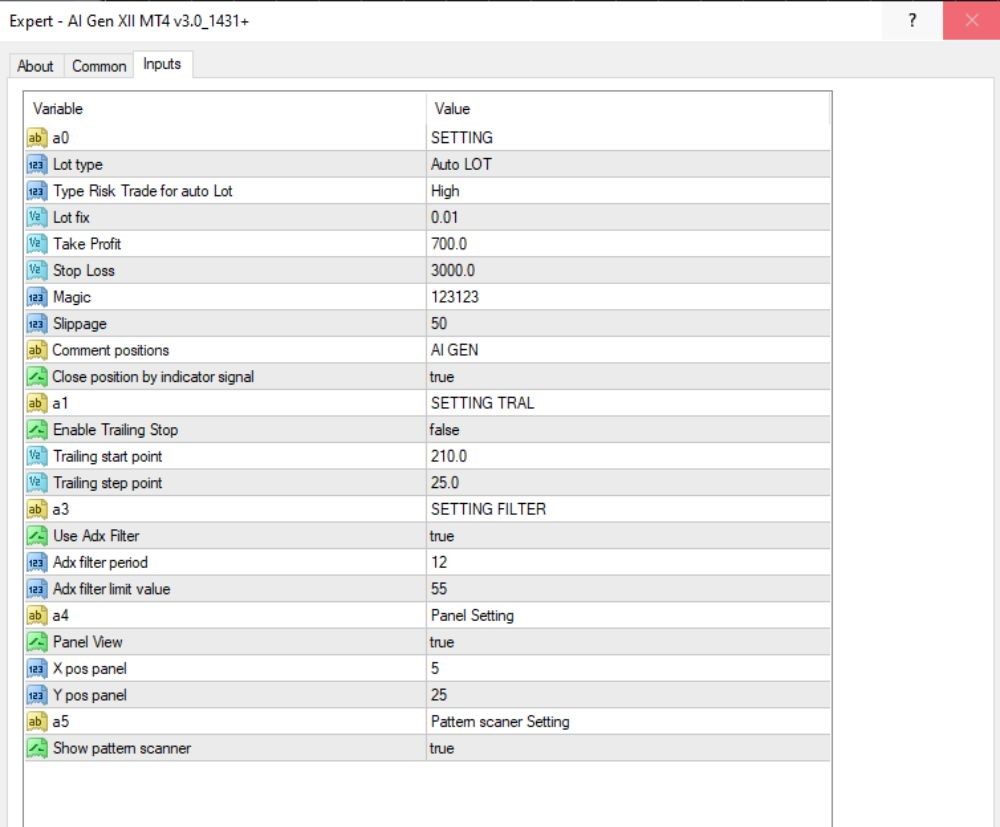
EA PARAMETERS ANALYSIS
- a0 SETTING
First group of settings’ name; does not influence trading logic. - Lot Type: Auto LOT
Calculates lot size automatically according to the chosen risk level. - Risk Level for Auto Lot: High
Orders a high-risk level, meaning large lot sizes. - Fixed Lot: 0.01
In the case of disabling auto lot, trading will be performed with this fixed size. - Take Profit: 700.0
Profit target in pips (or points, depending on the EA); a very high value, showing long-term trading. - Stop Loss: 3000.0
Large stop loss value, perhaps with plenty of room for risk in case market goes against. - Magic Number: 123123
Personal identification for the EA trades, to monitor and close pending trades. - Slippage: 50
Maximum slippage; i.e. 5 pips on 5-digit broker. - Trade Comment: AI GEN
Places this comment on all trades for the easy identification of trades opened by the EA. - Close by Indicator Signal: true
Allows the EA to close positions based on technical indicator signals.
TRAILING STOP
- a1 SETTING TRAL
Group title for trailing stop settings. - Enable Trailing Stop: false
Trailing stop is disabled. - Trailing Start Point: 210.0
Trailing stop, if enabled, won’t take effect until 210 pips of profit are reached. - Trailing Step Point: 25.0
Trailing stop, when enabled, moves every 25 pips as the price goes on.
FILTER BY ADX INDICATOR
- a3 SETTING FILTER
Label for the indicator filter settings group. - Use ADX Filter: true
Enables the use of the ADX indicator to filter entry signals. - ADX Filter Period: 12
The period used to calculate the ADX indicator. - ADX Filter Limit Value: 55
Trades are only allowed when ADX is greater than 55, indicating a strong market trend.
INTERFACE & SCANNER SETTINGS
- a4 Panel Settings
Group label for user interface configuration. - Display Panel: true
Enables the on-chart control panel. - Panel X Position: 5
Sets the horizontal placement of the panel on the chart. - Panel Y Position: 25
Sets the vertical placement of the panel on the chart.
Key Takeaways
- Intelligent Trading Algorithms: The EA uses sophisticated AI models that predict the direction of the market and make trades accordingly based on information.
- Risk Management: With an extremely low minimum of just $100, AI Gen XII EA is affordable to traders of all experience levels. It has aggressive risk management features to guard your investment.
- Flexible Account Compatibility: With micro, mini, or standard account, this EA operates beautifully, providing reliable performance on any of these accounts.
- Adjusted for XAUUSD: The EA is already optimized for GOLD trading in the M30 timeframe to capitalize on the extremely high frequency of trading opportunities the period offers.