









Blog
Albatross ver4 EA MT4 – Full Input Settings Analysis

Albatross ver4 EA is a trading robot for the Forex market that has been professionally designed. It is reputable and uses in-depth market analysis to spot the most potential trading opportunities. The robot identifies the largest market volumes to establish entry levels, after which it opens market orders. It also constructs a bi-directional grid of orders that reacts to the market direction, with both directions of orders being independent and each having its own take-profit target.
Buy Albatross ver4 EA product here
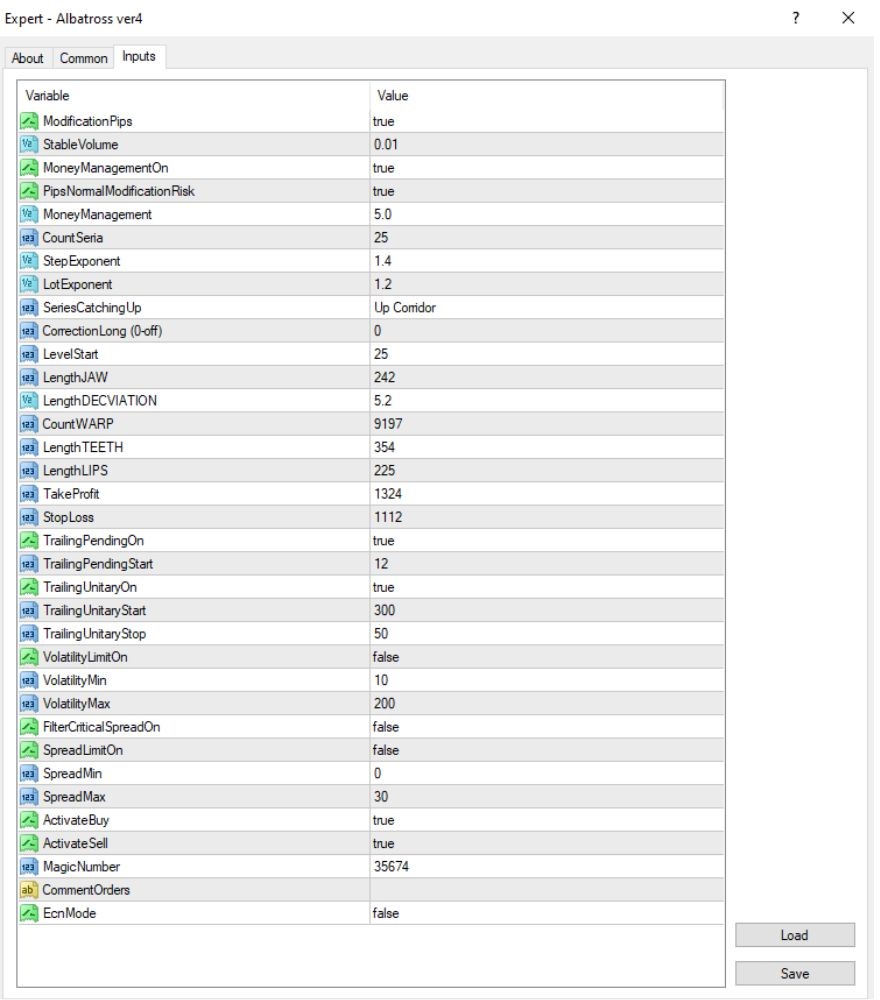
Main transaction configuration
- ModificationPips: True
→ Enables change of pip distance among orders. - StableVolume: 0.01
→ The default trade volume is 0.01 lots. - MoneyManagementOn: True
→ Activates automatic money management. - PipsNormalModificationRisk: True
→ Changes risk according to pip values. - MoneyManagement: 5.0
→ Maximum capital risk, as a percentage or units provided.
Set up grid/martingale strategy
- CountSeria: 25
→ Ties up the number of trades in a grid or martingale series to a maximum. - StepExponent: 1.4
→ Tunes increasing distance between grid orders with a multiplier. - LotExponent: 1.2
→ Scales lot size incrementally along grid orders as per this multiplier. - SeriesCatchingUp: Up Corridor
→ Employs a trend-following algorithm in an upward price corridor. - CorrectionLong: 0
→ Turns off long position correction logic.
TP / SL & Trailing
- TakeProfit: 1324
→ Sets take profit value to 1324 points (132.4 pips). - StopLoss: 1112
→ Sets stop loss value to 1112 points (111.2 pips). - TrailingPendingOn: True
→ Enables trailing stop for pending orders. - TrailingPendingStart: 12
→ Trailing for pending orders begins when in profit by 12 points. - TrailingUnitaryOn: True
→ Enables trailing stop for single running trades. - TrailingUnitaryStart: 300
→ Trailing begins when trade is in profit by 300 points. - TrailingUnitaryStop: 50
→ Trailing stops when trailing is activated, it holds 50 points from the price.
Volatility & spread filters
- VolatilityLimitOn: False
→ Volatility filter is disabled. - VolatilityMin: 10
→ Minimum volatility setting (in effect only when enabled). - VolatilityMax: 200
→ Maximum volatility setting (in effect only when enabled). - FilterCriticalSpreadOn: False
→ High-spread filtering is turned off. - SpreadLimitOn: False
→ Spread limit is turned off. - SpreadMin: 0
→ Minimum allowed spread (used in effect if spread limit is enabled). - SpreadMax: 30
→ Maximum allowed spread is 30 points (or 3.0 pips).
Key Takeaways
- The EA utilizes a proprietary algorithm to study market trends, making it possible to predict trend reversals accurately and allow for optimal trading choices.
- It continuously examines price action and market data, automatically closing existing positions and entering new ones to ensure consistent capital growth.
- Albatross provides sound preservation of investors’ capital, effectively minimizing risk and delivering stable returns while eliminating the technicalities and emotional pressures of manual trading.