









Blog
ALGO SCALP PRO EA MT4 – Full Input Settings Analysis


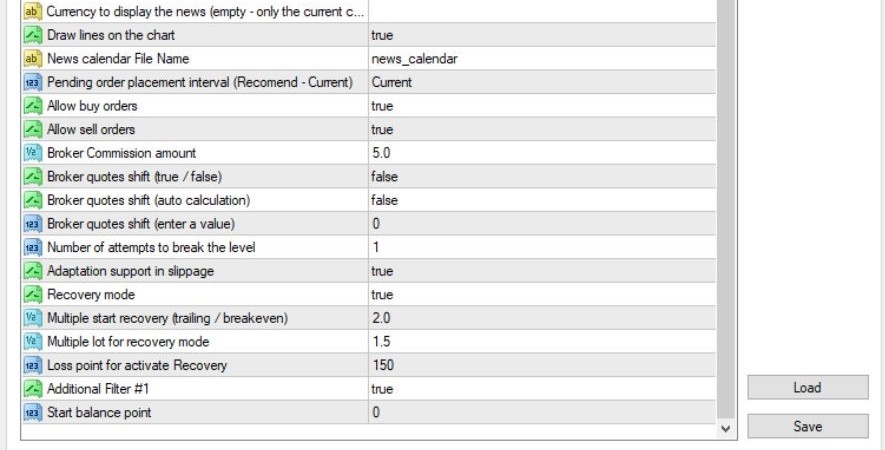
Algo Scalp Pro EA is an advanced scalping Expert Advisor with a loss recovery, created for use on the MetaTrader 4 platform. Well backtested during 2010 to present under different market conditions, it gives good performance. With strict adherence to stop loss guidelines, FIFO guidelines, and without Martingale/grid/hedging, it employs one lot increment in its recovery function.
Buy ALGO SCALP PRO EA product here

Main settings
- Magic Number
25458 – The special number to identify trades opened by this EA as distinct from other ones. - Show Info Panel
false – Disables display of the information panel on the chart. - Lot Calculation Mode
AutoLot – Automatically calculates lot size depending on risk percentage. - Risk
10.0 – Refers trading risk to 10% of account equity. - Fix Lot
0.1 – If AutoLot is disabled, a fixed lot of 0.1 will be used for all trades.
Take profit – Cut loss
- Take Profit
1000.0 – Quite high TP, likely placed as a limit and not an actual take-profit figure. - Stop Loss
210.0 – Sufficient stop loss for price fluctuations. - Adaptation SL in Case of Slippage
true – Stop Loss will be automatically adjusted to slippage circumstances. - Close Trade if Slippage > Max
true – Trades will be automatically closed upon exceeding the maximum permissible slippage. - Maximum Slippage
40 – Maximum permitted slippage (in pips or points, as set by broker).
Order Management & Breakeven
- Breakeven
false – Breakeven feature is disabled. - Trailing Stop
true – Trailing Stop feature is enabled. - Trailing Stop Value
8 points – Trailing stop will activate once the trade is in profit by 8 points. - Trailing Step
2 points – Stop Loss will trail the price every 2 points in profit. - Split to X Orders
2 – Every trade will be split into 2 separate orders.
News and Filters
- Enable Hard News
true – Enables filtering high-impact news events (e.g., FOMC, Non-Farm Payroll). - News Filter
false – Enables general news filter. - Currency to Display News
true – Displays only. news for the currently active trading currency pair. - Draw Lines on the Chart
true – Displays news event lines directly on the chart for easy reference.
Key Takeaways
- Extensive Testing: AlgoScalpPro EA was tested extensively from 2010, in different market conditions, and on professional software that mimics real market conditions.
- Strategy Methodology: There is no martingale, hedging, or grid method applied by this Expert Advisor. It has a very advanced loss recovery system with one step per lot.
- Recommended Settings: The EA can be used by traders for the EURUSD symbol with an H1 timeframe. It works best with a tight spread (0-5 pips) ECN/STP broker and low stop loss level (0-1 pips).
- Operational Suggestion: In order to work efficiently, use a VPS server is recommended.