









Blog
BOSTON EA MT4 – Full Input Settings Analysis


Boston EA is a very strong utility that has been specifically built for application on MetaTrader 4 (MT4) platforms. Boston EA makes backtesting much easier through the provision of the ability to edit many EA parameter files (Set files) in an easy, spreadsheet-based interface. The users are able to easily produce Set files with different values using this utility, thereby fine-tuning and optimizing their trading strategies.
Buy BOSTON EA product here
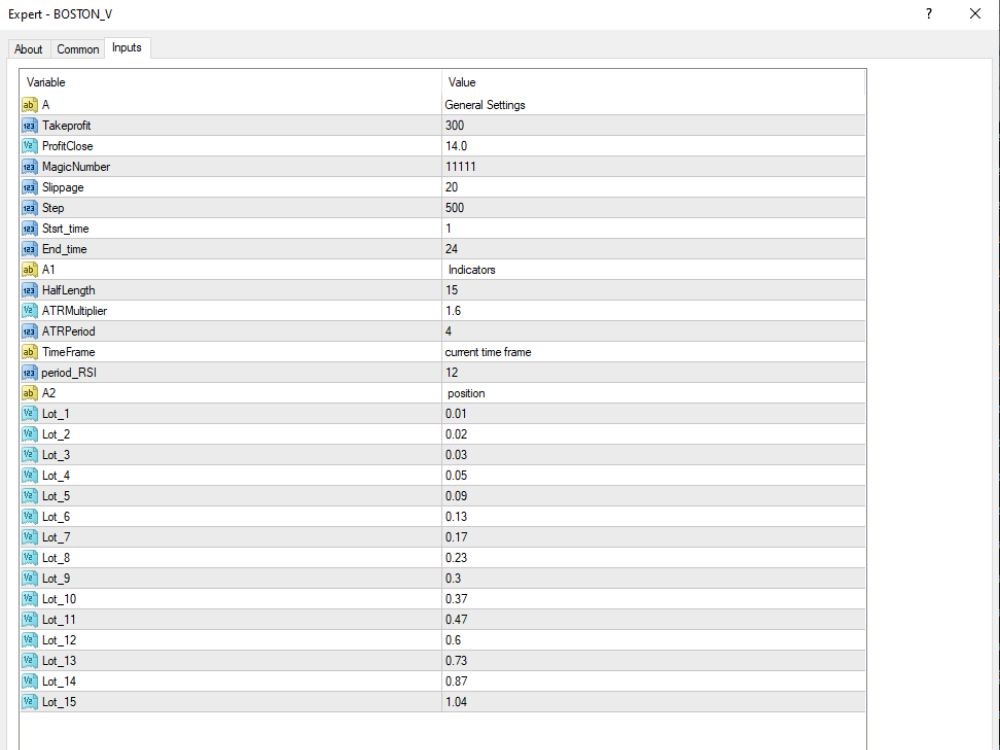
General Settings
- TakeProfit: 300
→ Target profit point or pips, depending on broker. - ProfitClose: 14.0
→ Closes all positions when overall profit is equal to this (supposedly in pips or USD, depending on EA setup). - MagicNumber: 11111
→ EA magic number to distinguish orders as coming from a different EA. - Slippage: 20
→ Slippage value to open orders. - Step: 500
→ Trade step (in points) in a Martingale or Grid cycle. - Start_time: 1
→ EA begins trading from server time 01:00. - End_time: 24
→ EA closes trades at midnight server time (24:00).
Indicators
- HalfLength: 15
→ Can be employed to filter the signals as a parameter of a custom indicator. - ATRMultiplier: 1.6
→ ATR value multiplier – typically employed to scale the stop loss or entry level. - ATRPeriod: 4
→ Calculation period of ATR. - TimeFrame: current time frame
→ Trading on the chart’s current time frame. - period_RSI: 12
→ RSI period for filtering the trade entry.
Key Takeaways
- Reliability: The BOSTON EA is respected for its reliability, which makes it compatible for all types of traders, from inexperienced to experienced.
- Tailored Set Files: Set files offer the flexibility to adjust the EA’s performance. We’ll delve into the suggested set files tailored for particular currency pairs.
- Risk Mitigation: The EA has risk management capabilities to safeguard your capital investment.