









Blog
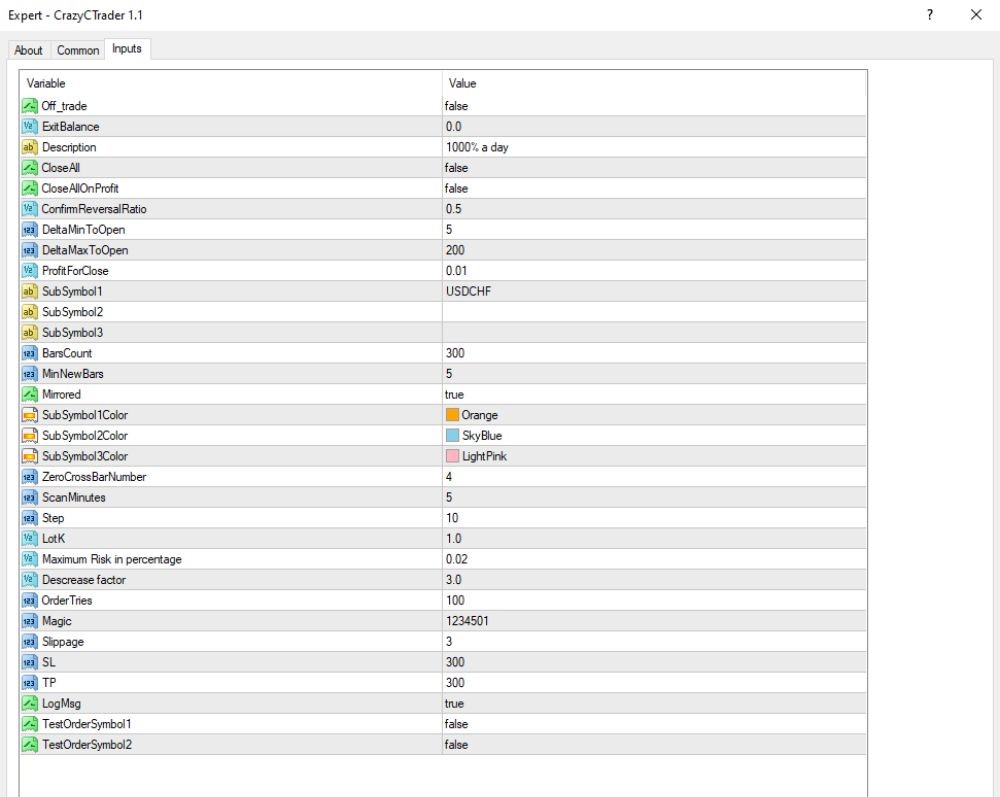
CRAZY CTRADER EA MT4 – Full Input Settings Analysis


Crazy CTrader EA, being an Expert Advisor (EA), is intended to be used only with the cTrader trading platform. The automatic trade system performs trade operations automatically, making trades based on specific parameters and algorithms. Its main purpose is to discover good conditions on financial markets and earn money for users. On the basis of strong algorithms, it tries to discover good conditions for trades and provide traders with easier and possibly more profitable trading.
Buy CRAZY CTRADER EA product here
Trade Management
- ExitBalance: 0.0 – There is no exit balance when the trade is to be closed.
- CloseAll: false – Does not close all the open trades.
- CloseAllOnProfit: false – Never closes all profitable trades.
- ProfitForClose: 0.01 – Trailing stop profit on closing a trade.
- SL (Stop Loss): 300 points – All the trades are stop-loss hedged.
- TP (Take Profit): 300 points – All trades are equipped with a take-profit level.
- Slippage: 3 – The maximum slippage to be allowed on opening/closing trades.
- OrderTries: 10 – Attempts to place a trade when an attempt to place a trade is rejected.
- Magic Number: 1234501 – EA’s own trade number.
Risk & Lot Management
- Maximum Risk per Trade: 0.02 (2% of account balance)
- Lot Multiplier (LotX): 1.0 – Base multiplier for lot size.
- Decrease Factor: 3.0 – Lot size is reduced after losing trades.
Signal & Entry Logic
- Confirm Reversal Ratio: 0.5 – Threshold ratio to accept deviation from trend.
- DeltaMinToOpen: 5 – Minimum delta/spread to open a trade.
- DeltaMaxToOpen: 200 – Maximum delta/spread to open a trade.
- MinNewBars: 5 – Minimum new bars to confirm a signal.
- BarsCount: 300 – Candles to check to create a signal.
- ZeroCrossBarNumber: 4 – Candles cross-check for confirmations on the zero-line.
- ScanMinutes: 5 – Scanning interval for signals (every 5 minutes).
- Step: 10 – Order step size between orders (if grid or layered entries are employed).
- Mirrored: true – Reversal of the strategy mode is enabled.
Key Takeaways
- Strategy: EA employs trend-following oscillators and indicators, merging technical tools like Stochastic Oscillator, RSI, and Moving Averages.
- Trade Management: It logs trades on stop-loss and take-profit orders, and offers features like trailing stop-loss, take profit, and breakeven.
- Flexibility: Makes trades in several currency pairs and timeframes, enhancing trading flexibility.
- Installation: Copy or move the CrazyCTrader 1.1.ex4 file to the “Experts” folder of the MetaTrader 4 platform.
- Testing: Test the EA on a demo account for 4-6 weeks before using it on an actual trading account.