









Blog
CYNERA EA MT4 – Full Input Settings Analysis

CyNera Expert Advisor is a professional Expert Advisor for MetaTrader 4 trading platform. Architecturally, it is designed for trading gold, one of the most volatile instruments. This EA will use neural network technology for improving decision-making and prediction accuracy, precise analysis with sound risk management for maximizing trading performance.
Buy CYNERA EA product here
General Information & Strategy Settings
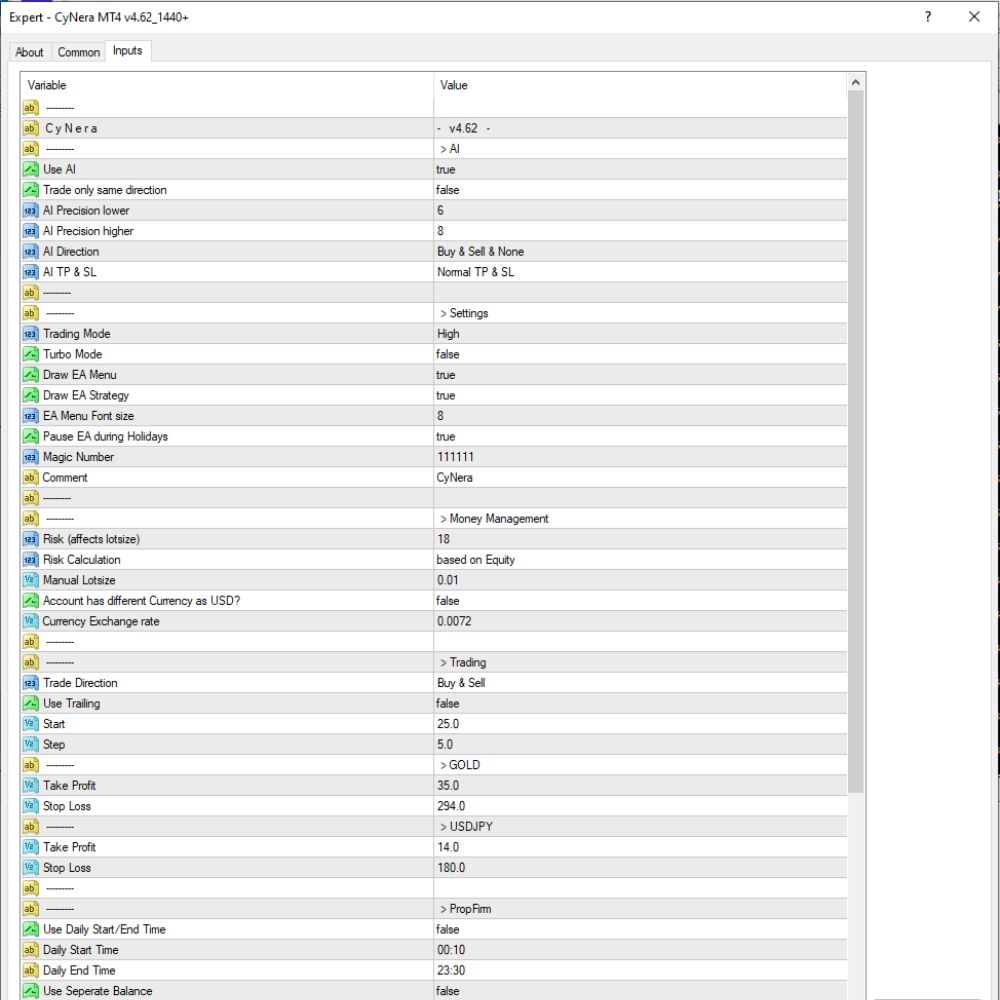
- EA Version: v4.62. The build has AI-based trading capability.
- AI Usage: True (on). The EA uses AI algorithms for making trading decisions.
- AI Precision Lower / Higher: Both 6 and 8, which regulate the range of the precision of the AI in selecting the trade entries.
- AI Direction: Buy & Sell & None. The AI can go long, short, or no position depending on market conditions.
- AI TP & SL Mode: Normal TP & SL. Normal stop loss and take profit levels are employed.
- Trade Only Same Direction: Disabled so that the EA can trade in both directions simultaneously.
- Magic Number: 111111. This is the magic number employed by the EA for recognizing trades that it has entered.
- Comment: CyNera. The EA comments all the trades it opens with this so they can be easily traced.
- Trading Mode: High. The EA performs high mode trading.
- Turbo Mode: Off (false). Turbo trading speed is not activated.
- Draw EA Menu & Strategy: On (true). The EA strategy and menu graphics are plotted on the chart.
Risk Management and Capital Management
- Risk Level: 18. This is quite risky trading and strongly influences lot size calculation.
- Risk Calculation: Equity-based. The EA takes lot size into account with regards to existing account equity.
- Manual Lotsize: 0.01. Applies only when automatic lot sizing is disabled.
- Non-USD Account: false. The account is considered to be in USD by default.
- Currency Exchange Rate: 0.0072. It applies if currency conversion is required.
Specific Strategy and Trade Settings
- Trade Direction: Buy & Sell. EA can trade in both directions.
- Use Trailing: Disabled (false). The trailing stop is not utilized.
- Step & Start: Step is 5.0 and start lot adjustment from 25.0.
- Pair-specific Take Profit & Stop Loss:
- For GOLD, TP is 35 and SL to 294, i.e., a relatively smaller target with a large stop.
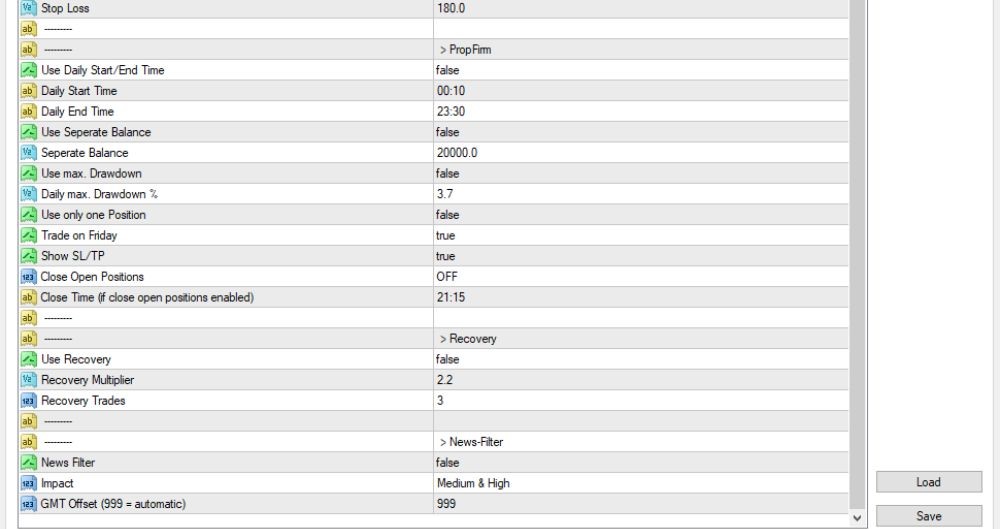
- For USDJPY, TP = 14 and SL = 180, and it also has a high-risk-reward ratio.
- Prop Firm Settings:
- Daily Start/End Time is disabled, hence intraday trading time limit is not set.
- Separate Balance is set to false, i.e., balance is not isolated for calculation of risk.
- Max Daily Drawdown is disabled. The limit of 3.7% that is set is not applied since the filter is disabled.
- Friday trading is allowed (true), so the EA continues until the end of the trading week.
- Display SL/TP is enabled, so Stop Loss and Take Profit are visible on the chart.
- Close Open Positions is off, so the EA will not close a trade automatically.
- Close Time has been configured to 21:15, but this feature does not work if auto-close is turned off.
Restore Commands & Filter News
- Recovery Settings
Use Recovery is disabled (false), and no recovery or averaging strategy is employed.
Recovery Multiplier = 2.2 and Recovery Trades = 3, but both are not used since the recovery mode is disabled. - News Filter
News Filter is disabled (false), and the EA is therefore not avoiding trades around news events.
The selected impact levels are Medium & High, but they are not active with the filter disabled.
GMT Offset is 999, so the EA will automatically set the broker’s server time.