









Blog
Diamond PRO EA MT4 – Full Input Settings Analysis


Diamond PRO EA is professional-grade version for professional traders with optimized cores, enhanced entry point filters, and sophisticated profit closure algorithm. The software is highlighted through precise market entries, expert economic news filtering, spread guarding, and sophisticated position management. Maximum safety is attained with maximum trading performance as the primary purpose. After installation and configuration, the expert operates smoothly in fully automatic mode.
Buy Diamond PRO EA product here
Trade Settings & Lot Size
- Lot Management
- AutoLot is set to
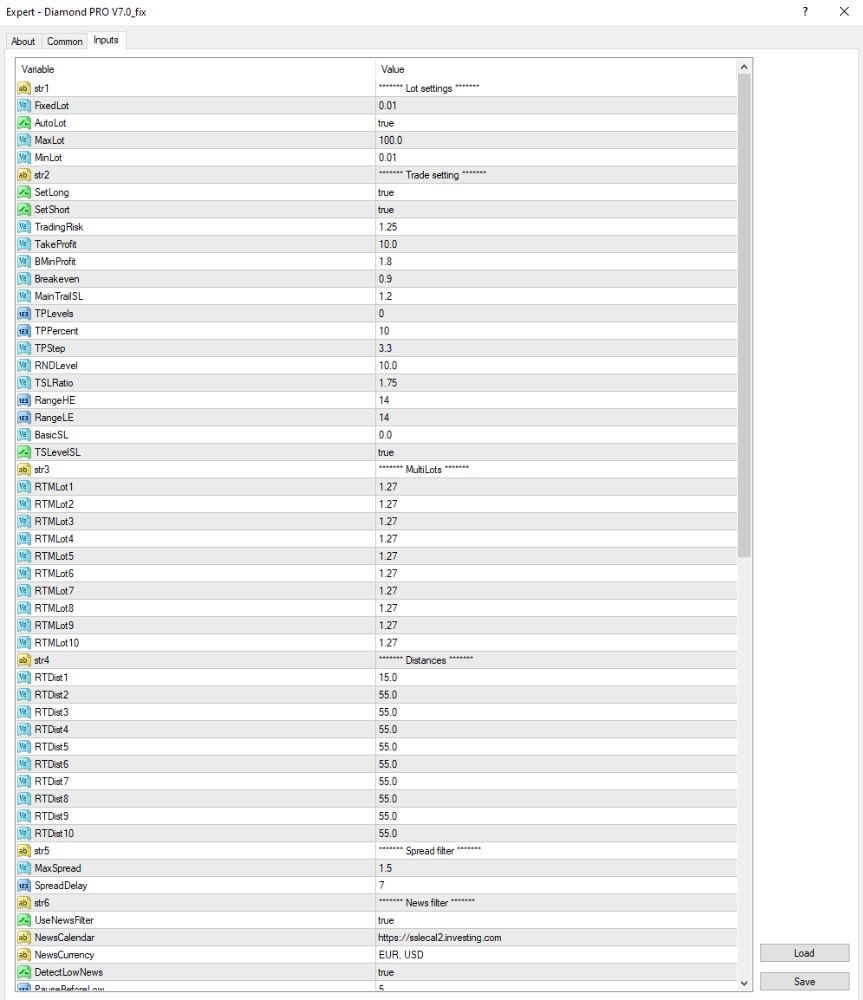
true, so the EA automatically calculates the trade lot size based on account balance and risk settings. - FixedLot is set to 0.01, with a minimum lot size of 0.01 and a maximum lot size of 100.0. These values define the boundaries for trade volume, whether in automatic or manual mode.
- AutoLot is set to
- Trading Strategy
- The EA will open both a buy and sell trade, and SetLong and SetShort both equal true.
- Take Profit is 10.0, so the trades will be automatically closed when a profit of 10 units (e.g., pips or points, depending on broker options) is realized.
- Breakeven is used at 0.9, so the EA will move the stop loss to breakeven when the trade is this far into profit.
- MainTrailSL is set to 1.2, so the EA follows the stop loss following the price movement advantageously by that value.
- BasicSL is set to 0.0, which implies no fixed stop loss is applied at first.
- TSLevelSL is true (active), which allows a complex trailing stop mechanism.
- TSLRatio is set to 1.75, which determines the aggressiveness of how the trailing stop fluctuates in response to price movement.
Martingale/Grid Strategy
- Multilot Settings
There are 10 lot levels from RTMLot1 to RTMLot10, all of which are given a value of 1.27. This is utilized as the multiplier in order size expansion in the grid. - Order Distance
The initial grid order distance (RTDist1) is 15 points, and the order distances for orders 2–10 (RTDist2–10) are all defined as 55 points. This defines the distance between the orders in the grid. - Order Limits
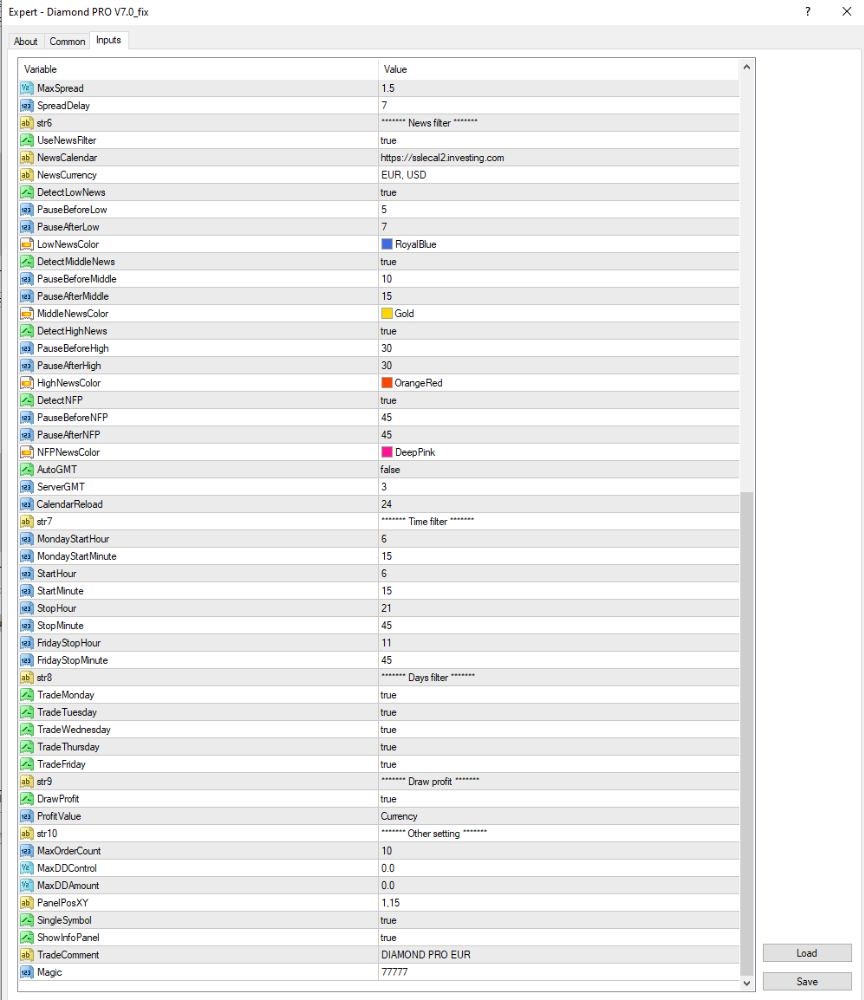
Maximum open orders (MaxOrderCount) is limited to 10, hence the EA will not open a maximum of 10 orders at any point in time. - Drawdown and Risk Control
- MaxDDControl is 0.0, meaning no maximum drawdown is set.
- TradingRisk is 1.25, which is the percentage account equity utilized when AutoLot is active.
Display & Misc Settings
- The setting DrawProfit is enabled (true), so the EA will display current profit on the chart itself.
- SingleSymbol and ShowInfoPanel are both enabled. This allows the EA to display a small information panel based on the symbol currently being traded.
- ProfitValue is set to be Currency, so it displays profit in monetary terms rather than pips or percentage.
- The Magic Number is set to 77777, which is utilized as a marker for orders placed by this EA.
- The TradeComment is set to DIAMOND PRO EUR, which will be attached to every order so they can easily be identified in trade history.
- PanelPosX and PanelPosY define the location of the EA’s control panel in the chart window.
Key Takeaways
- Accuracy Entry Point Filter: With extremely refined entry point filter, the system enables accurate and efficient market entries, securing performance and trading efficiency.
- Enhanced Trading Performance: Diamond PRO is designed with improved trading performance as its primary target, utilizing optimized algorithms and advanced features to deliver superior performance under dynamic market conditions.
- Specific Parameters for Fine-Tuning: There exist a broad set of parameters provided to clients that offer greater flexibility to fine-tune according to specific trading strategies and tastes.
- High-Tech Multi-Stage Profit Closure Algorithm: Diamond PRO possesses its high-tech multi-stage profit closure algorithm to ensure accurate and effective profit securing with maximum returns while effectively reducing risks.