









Blog
EA Daytrade Pro Algo MT4 – Full Input Settings Analysis


DayTrade Pro Algo EA makes trades in price action in key daily support and resistance levels where such levels provide the opportunity for profit. The system’s algorithmic method of operation involves every trade having a stop-loss and a take-profit level, and a trailing stop-loss strategy to lock in gain and limit loss. With 10 trades per week on average, the system is highly dependable. Also, the users are able to switch settings to achieve profitability on multiple currency pairs.
Buy EA Daytrade Pro Algo product here
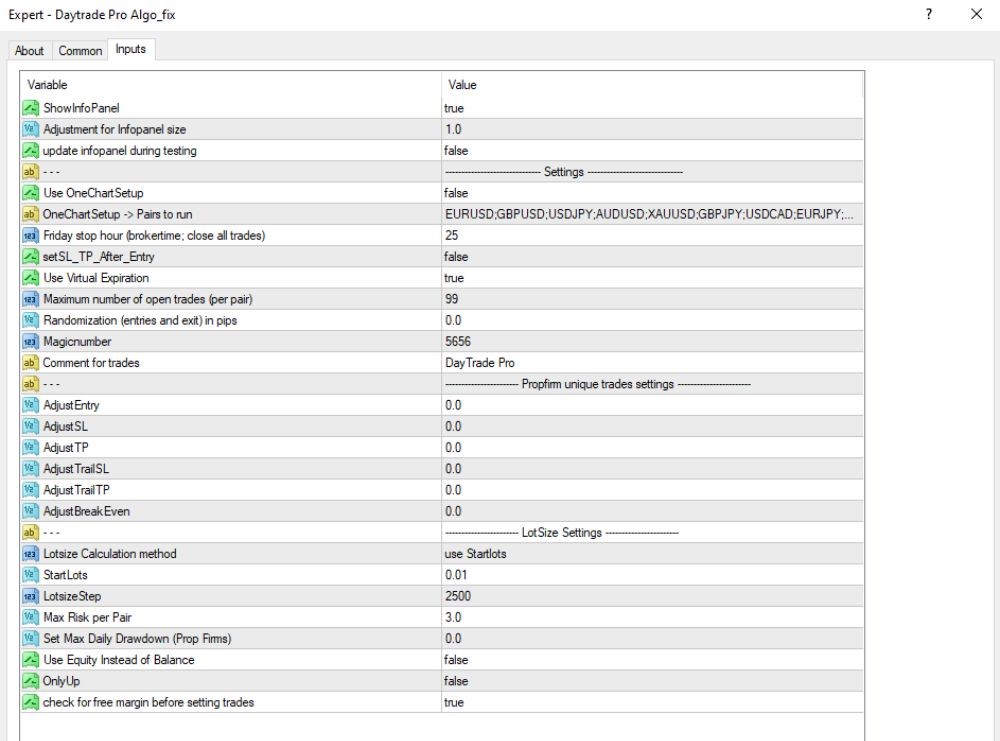
General transaction settings
- OneChartSetup: false – Does not use “One Chart Setup” (multi-pair trading off single chart)
- OneChartSetup → Pairs to run: EURUSD, GBPUSD, USDJPY, AUDUSD, XAUUSD, GBPJPY, USDCAD, EURJPY – List of pairs to run if OneChartSetup is enabled
- Friday stop hour (broker time; close all trades): 25 – Time (broker server) to close all trades on Friday
- setSL_TP_After_Entry: false – Does not set SL/TP after opening orders
- Use Virtual Expiration: true – Enables virtual expiration (manages expiry internally instead of broker-side pending order limits)
- Maximum open trades (per pair): 99 – Highest trades per currency pair
- Randomization (entries and exit) in pips: 0.0 – No random points of entry and exit
- Magicnumber: 5656 – Personal Magic Number to use to recognize EA orders
- Comment for trades: DayTrade Pro – Trade comment label
Fine tune entry & SL/TP
- AdjustEntry: 0.0 – No entry point adjustment
- AdjustSL: 0.0 – No adjustment to stop loss
- AdjustTP: 0.0 – Don’t adjust for take profit
- AdjustTrailSL: 0.0 – No trailing stop loss adjustment
- AdjustTrailTP: 0.0 – No trailing take profit adjustment
- AdjustBreakEven: 0.0 – No break-even level adjustment
Lot Size Settings
- Lotsize Calculation mode: apply StartLots – Lot size is calculated in relation to StartLots parameter
- StartLots: 0.01 – Initial lot per order
- LotsizeStep: 2500 – Lot size step, maybe used in martingale or grid trading
- Max Risk per Pair: 3.0 – Max risk per pair (relative to account or EA unit)
- Set Max Daily Drawdown (Prop Firms): 0.0 – No daily drawdown is set (used for prop firm regulations)
- Use Equity Instead Of Balance: false – Uses balance (instead of equity) in lot/risk calculations
- OnlyUp: false – Does not restrict trades to long (buy) positions only
- check free margin before entering trades: true – Checks free margin before entering trades
Key Takeaways
- Versatile Adapatability: The algorithm is very adaptable in the sense that it offers flexibility in terms of setting adjustments to fit diverse forms of trading and personal risk management decisions.
- User-Friendly Installation: Installation is simplified by the “OneChartSetup” option, easily allowing simple installation on a EURUSD Daily chart and giving an easy-to-use, intuitive user interface.
- Personalized Risk Management: With several choices of lot sizes, the algorithm retains scope to maneuver according to different risk appetites, thus enabling the traders to customize the risk management approach to their exact requirements and objectives.