









Blog
NAS100 EA MT4 – Full Input Settings Analysis


Buy NAS100 EA product here
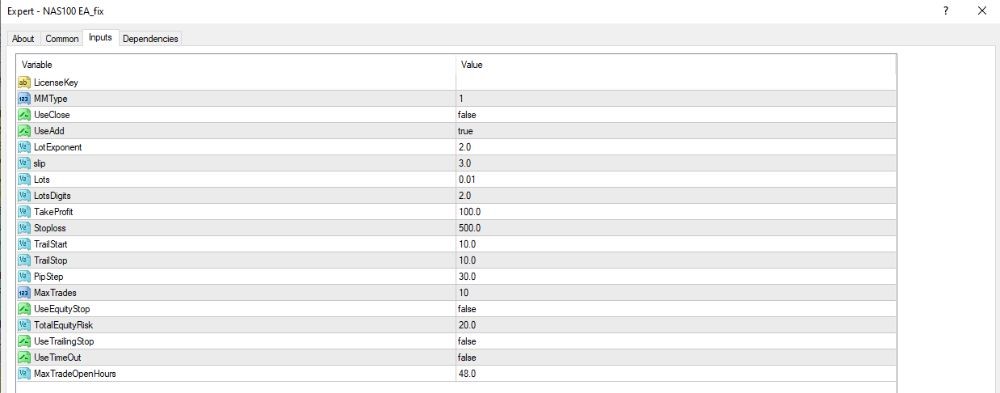
Basic trading settings
- MMType: 1
Select money management type. Value 1 usually indicates fixed or semi-automatic mode. - UseClose: false
Do not close trades automatically. - UseAdd: false
Do not add trades in the same direction (no trade stacking). - LotExponent: 2.0
Multiplier for the lot size of the next trade when adding positions. Not used since UseAdd = false. - slip: 10
Maximum slippage permitted is 10 points (about equal to 1 pip on most brokers). - Lots: 2.0
Each trade will be started with a lot size of 2.0. - LotsDigits: 2
Round lot size to 2 decimal places.
Set take profit – stop loss – trailing stop
- TakeProfit: 100.0
Set take profit to 100 points. - Stoploss: 500.0
Set stop loss to 500 points. - TrailStart: 50.0
Trailing stop activates when profit is 50 points. - TrailStop: 30.0
Trailing stop maintains a 30-point difference from the current price. - TPStep: 10.0
Take profit step — can also define trailing stop update interval.
Risk control and trading time
- MaxTrades: 10
Allows up to 10 trades to be open at the same time. - UseEquityStop: false
Equity-based stop loss is turned off. - TotalEquityRisk: 20.0
If equity stop is enabled, trades will be closed when the account equity drops by 20%. - UseTrailingStop: false
Trailing stop is turned off, though corresponding parameters are set. - UseTimeOut: false
There is no time limit for how long trades can remain open. - MaxTradeOpenHours: 48.0
If time-out is enabled, all trades will automatically close after 48 hours.