









Blog
NEON TRADE EA MT4 – Full Input Settings Analysis


Buy NEON TRADE EA product here
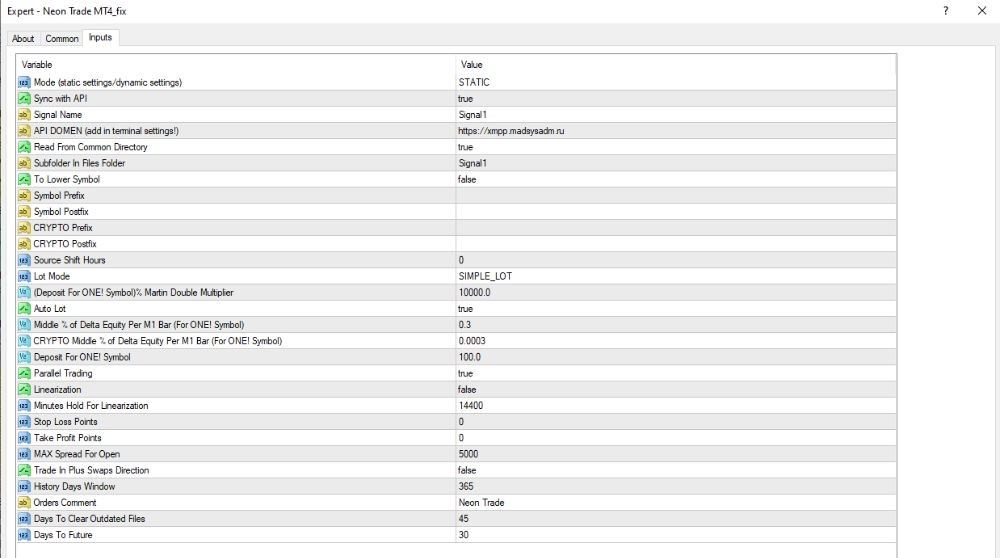
Set up operating modes and trading signals
- Mode (static/dynamic settings): STATIC
The EA operates on fixed (static) settings that are not dynamic to market conditions. - Sync with API: true
Signals are synchronized through API, referencing an external server. - Signal Name: Signal1
Name of the currently employed signal. - API DOMAIN: xmpp.maddyasdn.ru
Signal server domain — potentially under the control of a third party. - Read From Common Directory: true
Takes common data from the platform common directory. - Subfolder in Files Folder: Signal1
Subfolder in which signal data is stored.
Trading Strategy & Risk Control
- Lot Mode: SIMPLE_LOT
Runs fixed lot size for all trades. - Deposit for ONE Symbol / 3; Martin Double Multiplier: 10,000.0
Does a lot size calculation per $10,000 (divided by 3). Can be in relation to a martingale doubling system. - Auto Lot: true
Automatically calculates trade volume based on account balance. - Middle % of Delta Equity Per M1 Bar: 0.0
Not using equity delta per M1 bar to generate signals. - Parallel Trading: true
Allows trading on several pairs simultaneously. - Stop Loss Points: 0
No fixed stop loss — dangerous unless manually stopped. - Take Profit Points: 0
No fixed take profit — trades will close because of signal instead. - MAX Spread for Open: 365
Allows opening of trades even with extremely high spreads — very dangerous. - Trade in Plus Swaps Direction: true
Has bias toward trades in direction of positive swap (good for overnight interest).
Data Management & Transaction History
- Minutes Hold for Linearization: 14,400 (10 days)
Trades are held for 10 days prior to re-evaluation or adjustment. - History Days Window: 365
Uses 1 year of history for study. - Days to Clear Outdated Files: 45
Automatically deletes old files in 45 days. - Days to Future: 0
No forecast horizon. - Orders Comment: Neon Trade
All orders will be provided with this comment so that they can be identified easily.