









Blog
NEVER LOSING EA MT4 – Full Input Settings Analysis


Buy NEVER LOSING EA product here
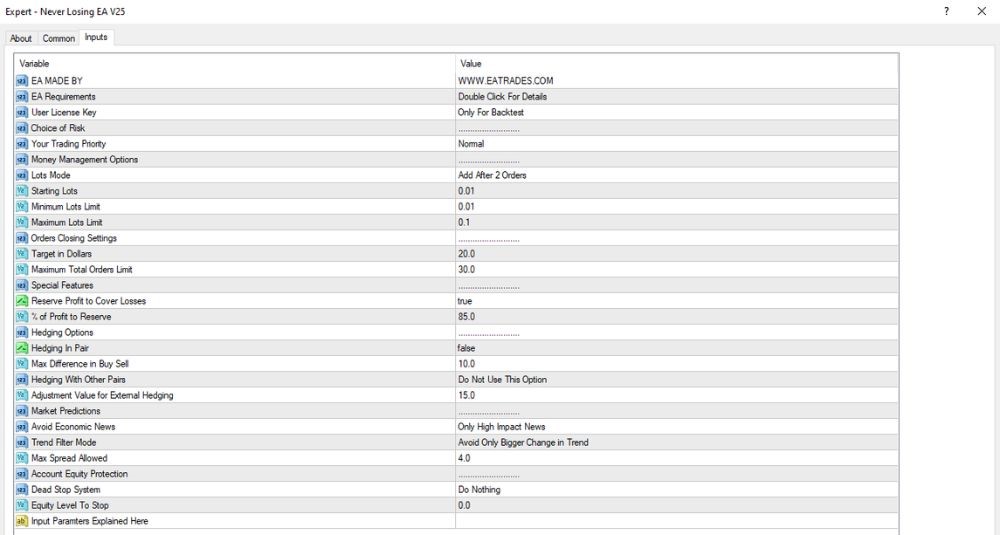
Capital management settings & order structure
- Lots Mode: Add After 2 Orders
Opens additional trades after 2 initial orders — gradually uses a martingale-type approach. - Initial Lots: 0.01
Initial Markets set the opening trade size to 0.01. - Minimum Lots Limit: 0.01
Minimum lot size will not go below 0.01. - Maximum Lots Limit: 0.1
Lot size will not be more than 0.1 — a reasonable protective ceiling. - Maximum Total Orders Limit: 30.0
The EA will not open up to 30 trades at a time. - Target in Dollars: 20.0
The trades will be closed when the profit is $20. - Reserve Profit to Cover Losses: true
The EA reserves some of the profit to serve as a buffer for future losses. - % Profit to Reserve: 85.0%
85% of profit is reserved to control risk.
Hedging Strategy & Entry Signals
- Hedging in Pair: false
Intra-pair hedging (buy and sell on the same pair) is turned off. - Max Difference in Buy/Sell: 10.0
Maximum allowed difference between buy and sell positions — not applied because hedging is turned off. - Hedging with Other Pairs: false
Cross-pair hedging is also turned off. - Market Predictions: Normal
Uses a normal-level trend prediction methodology. - Avoid Economic News: Only High Impact News
The EA does not trade for major economic news only. - Trend Filter Mode: Skip Only Larger Change in Trend
The EA will only skip trades when there are big changes in trend.
Account protection & risk control
- Max Spread Allowed: 4.0
Spread is limited to 4.0 pips — a safe level for execution. - Account Equity Protection: Disabled
Equity-based account protection is turned off. - Dead Stop System: Do Nothing
In adverse market conditions, the EA does nothing — it will not force-close or close positions. - Equity Level to Stop: 0.0
No equity level to stop trading.