









Blog
PFx Forex Scalper EA MT4 – Full Input Settings Analysis

PFx Forex Scalper EA is a forex scalper robot that executes automatic deals on the M15 time frame. It auto-trades various currency pairs, scans, and is optimized for EURUSD & GBPUSD. It is designed for fast capital accumulation with multi-currency analysis, low-spread optimization, and a risk management system built in.
Buy PFx Forex Scalper EA product here
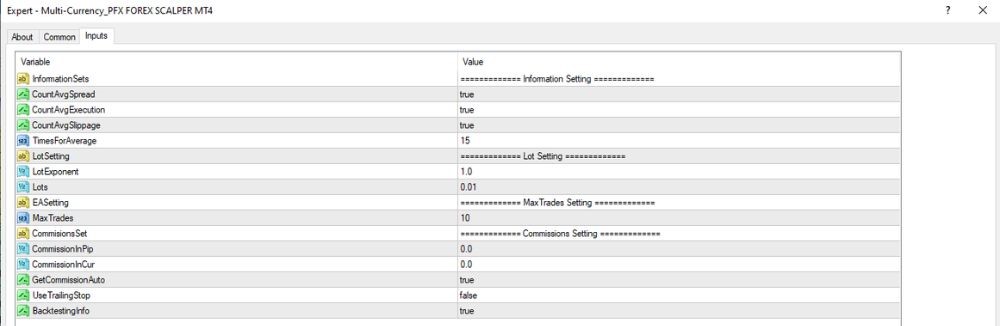
Information Setting
- InformationSets: – No specific value shown; likely used to enable turn on/off on-chart info displays.
- CountAvgSpread: True – Enables calculation of average spread when trading (is helpful for optimization or analysis).
- CountAvgExecution: True – Enables monitoring of average order execution time (execution speed).
- CountAvgSlippage: True – Enables monitoring of average slippage per trade.
- TimesForAverage: 15 – Average is calculated over the last 15 trades.
Lot Setting
- LotExponent: 1.0 – Multiplier for Martingale strategy lots. 1.0 turns Martingale off.
- LotSetting: – No value shown; most likely it’s the way to set lots (e.g., fixed lot, % of balance, etc.).
- Lots: 0.01 – Initial trade size is 0.01 lots.
MaxTrades Setting
- EASetting: – Not established clearly; can be the name of the current setting or a standard template.
- MaxTrades: 10 – The EA can have a maximum of 10 trades at a time.
Commissions Setting
- CommissionSet: – No value specified; likely denotes commission calculation method of EA (manual or auto).
- CommissionPip: 0.0 – No commission per pip.
- CommissionCurr: 0.0 – No commission in currency units.
- GetCommissionAuto: True – EA gets commission values automatically from broker (if enabled).