









Blog
Prop EA MT5 – Full Input Settings Analysis

Prop EA is a dependable Expert Advisor aimed at safeguarding funds and optimizing trading opportunities. It emphasizes fund protection via a meticulously calculated hedging strategy, acting as a vital risk and cost management tool for navigating trading challenges and achieving profitability in Prop-funded accounts.
Buy Prop EA product here
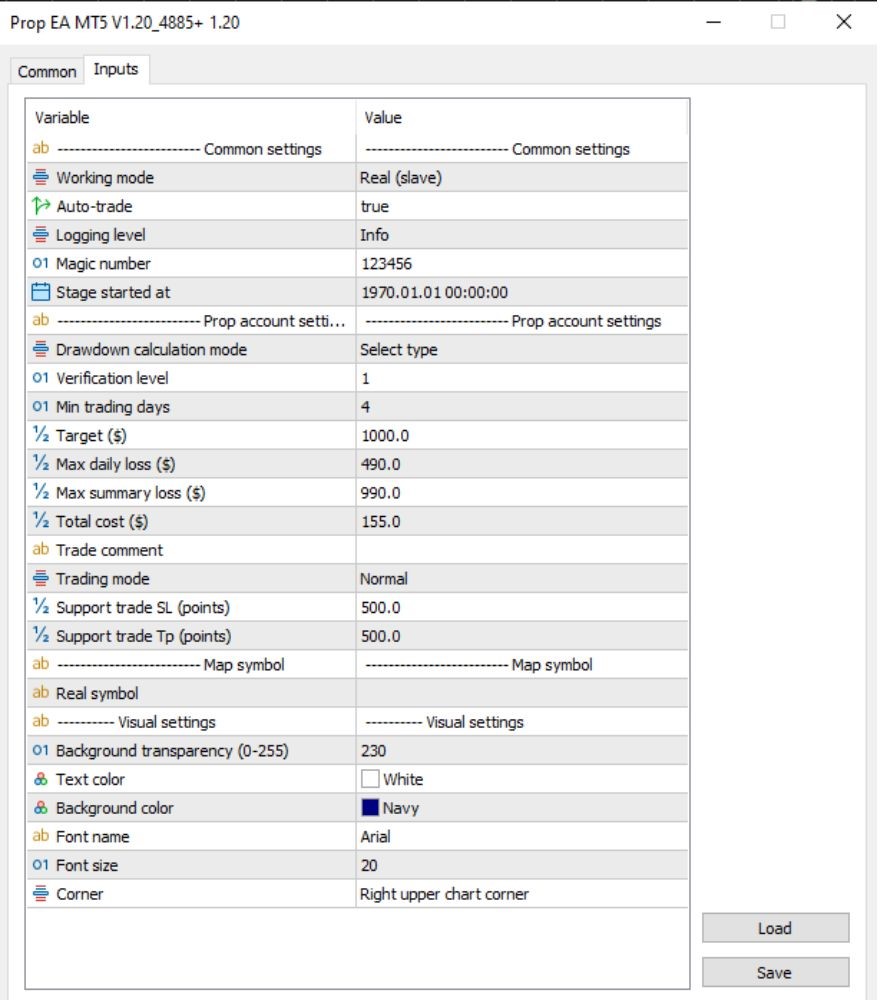
Common Settings
- Working Mode: Real (Slave) – Operates in live trading mode as a signal receiver.
- Auto-Trade: True – The EA executes trades automatically without manual input.
- Logging Level: Info – Logs essential trading activity for monitoring and debugging.
- Magic Number: 123456 – Unique identifier used to track and manage the EA’s trades.
- Stage Started At: 1970.01.01 00:00:00 – Default placeholder timestamp; actual start time may differ.
Trading Rules
- Trading Mode: Normal execution method for opening and closing positions
- Stop Loss: At 500 points to limit risk on the downside per trade
- Take Profit: 500 points to lock profits on all trades
Key Takeaways
- Strategic Hedging Mastery: PropEA features a meticulously crafted hedging strategy, expertly navigating trading challenges while recuperating costs, providing traders with a financial cushion.
- Systematic Trading Transition: Adoption of Expert Advisors like PropEA signifies a shift towards systematic and disciplined trading, departing from speculative approaches.
- Risk Mitigation Mastery: PropEA’s automated nature minimizes risks by removing emotional factors from trading decisions, crucial in proprietary trading.