









Blog
Quantum Emperor EA MT4 – Full Input Settings Analysis


Quantum Emperor EA is compatible only with MetaTrader 4, taking advantage of the platform’s superior capabilities. It is designed for trading in H1 timeframe, primarily in the GBPUSD currency pair. It focuses on a particular subset of market conditions to capitalize and enhance performance.
Buy Quantum Emperor EA product here
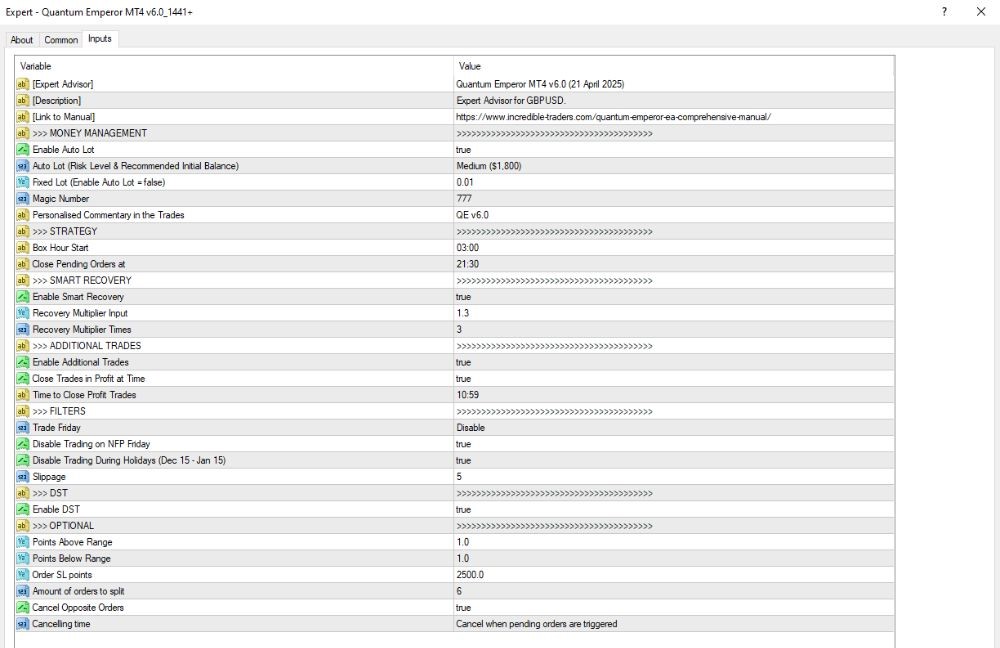
MONEY MANAGEMENT
- Enable Auto Lot: true – Turn on automatic lot size calculation on the basis of account balance.
- Auto Lot Level: Medium ($1,800) – For each $1,800 in account balance, the EA opens a 0.01 lot trade.
- Fixed Lot: 0.01 – Takes precedence if Auto Lot is enabled.
- Magic Number: 777 – Unique ID for tracking trades placed by the EA.
- Personalized Commentary: true – Adds personal comments to each trade for easier tracking or analysis.
SMART RECOVERY
- Enable Smart Recovery: true – Activates the loss recovery feature to reclaim previous losses.
- Recovery Multiplier Input: 1.3 – Each recovery trade increases lot size by a factor of 1.3.
- Recovery Multiplier Times: 3 – The recovery process can repeat itself up to 3 times.
ADDITIONAL TRADES
- Allow Additional Trades: true – Allows the EA to make further (additional) trades.
- Close Profit Trades at Time: true – Closes all profit trades at a specified time.
- Time to Close Profit Trades: 10:59 – The closing time for profitable trades is 10:59.
FILTERS
- Trade Friday: Disable – Disabling trading on Fridays to avoid heightened market volatility.
- Turn off Trading on NFP Friday: true – Trading is turned off on Non-Farm Payroll (NFP) Fridays.
- Disable Holiday Trading: true – No holiday trading from December 15 to January 15.
- Slippage: 3 – Slippage limit is a maximum of 3 points.
OPTIONAL
- Points Above/Below Range: 1 – Orders are placed 1 point above or below the specified price range (box).
- Order SL points: 2500.0 – Extremely large stop loss, likely a logical placeholder rather than an realistic number.
- Number of orders to split: 2 – An order is broken up into 2 parts.
- Cancel Opposite Orders: true – When a Buy order is triggered, the outstanding Sell order will be canceled and vice versa.
- Cancelling time: (Blank) – No fixed time for cancelling pending orders; they are cancelled if and when the opposite order is executed.