









Blog
Apex Trader EA MT4 – Full Input Settings Analysis


Buy Apex Trader EA product here
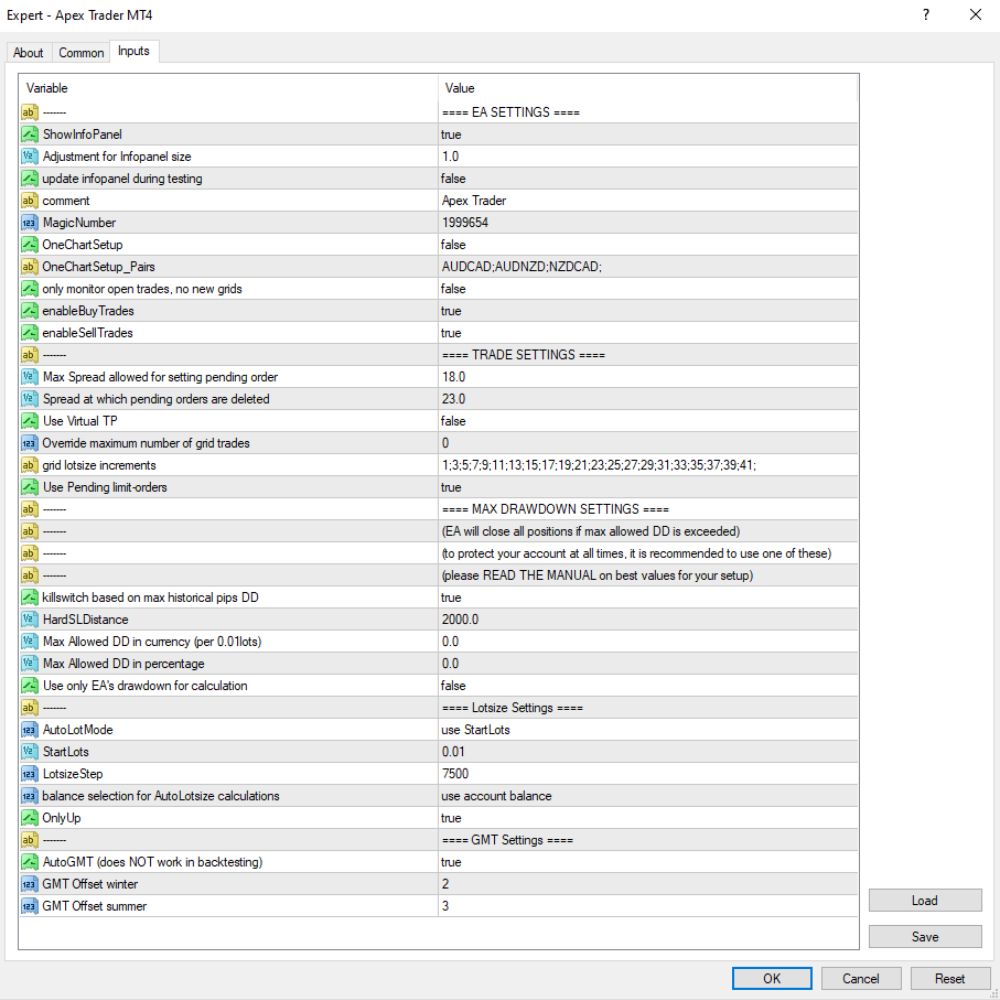
EA SETTINGS
- ShowInfoPanel: true
Shows the info panel on the chart. - Adjustment For InfoPanel Size: 1.0
Resizes the info panel. - Update InfoPanel During Testing: false
Turns off updating the info panel during backtesting. - Comment: Apex Trader
Trade comment to identify the EA on the trade history. - Magic Number: 1999654
Special magic number for the EA’s trades. - One Chart Setup: false
Allows the EA to be executed on multiple pairs if set to false. - One Chart Setup_Pairs: AUDCAD;AUDNZD;NZDCAD
Comma-delimited list of currency pairs to watch when OneChartSetup is active (true). - Only Monitor Open Trades: false
EA can open and maintain new trades. - Enable Buy Trades: true
Allows the EA to open buy trades. - Enable Sell Trades: true
Allows the EA to open sell trades.
TRADE SETTINGS
- Max Spread For Pending Order: 18.0
Allows placing pending orders if the spread is ≤ 18 pips (high—caution advised). - Spread Threshold To Delete Pending Orders: 23.0
When the spread is greater than 23 pips, the EA deletes pending orders. - Use Virtual TP: false
Disables virtual Take Profit; employs real server-side TP instead. - Override Max Grid Trades: true
Allows override of the grid strategy maximum number of trades. - Grid Lotsize Increments: 1:3:5:7:.:41
Lot sizes grow according to a predefined sequence (e.g., Martingale). - Use Pending Limit Orders: true
Uses limit orders instead of market orders.
MAX DRAWDOWN SETTINGS
- KillSwitchBasedOnMaxHistoricalPipsDD: true
Triggers emergency stop if drawdown in pips is higher than historical maximum. - HardSLDistance: 2000.0
Hard Stop Loss of 2000 pips – hardly ever makes SL be hit unless desperate. - MaxAllowedDDCurrency: 0.0
Drawdown unrestricted by currency. - MaxAllowedDDPercentage: 0.0
No percentage restriction on drawdown – BE CAREFUL: very high risk of account destruction unless set. - UseOnlyEADrawdownForCalculation: false
Drawdown calculation on whole account, not this EA.
Lotsize Settings
- AutoLotMode: use StartLots
→ Fixed lot size at start (AutoLot disabled). - StartLots: 0.01
→ All trades start with 0.01 lots. - LotsizeStep: 7500
→ Lot size is increased whenever account balance grows by 7,500 units (e.g., USD). - BalanceSelectionForAutoLotsize: use account balance
→ Account balance current is used to set AutoLot size (if AutoLot enabled). - OnlyUp: true
→ Lot size increases as balance rises, but does not decrease as balance drops.
Key Takeaways
- Apex Trader EA is a high quality automated trading robot from the team of skilled developers at ForexStore designed for MetaTrader 4 platform.
- Founded on a wealth of experience, it brings with them powerful trading tools for all types or traders.
- The smart network system of the mt4 platform allows you to open several positions, so increasing your earnings using trend optimization.