









Blog
Arbiter Server Agent MT5 – Full Input Settings Analysis


Arbiter Server Agent MT5, an Expert Advisor for the MetaTrader 5 platform, is precision-crafted and better suited to detect and close trades by differences in price among various brokers. It is an essential utility for forex traders employing latency forex arbitrage techniques. The EA appears to be coded to provide automatic trading decisions based on sophisticated strategies or algorithms particular to optimizing trading efficiency and profitability.
Buy Arbiter Server Agent product here
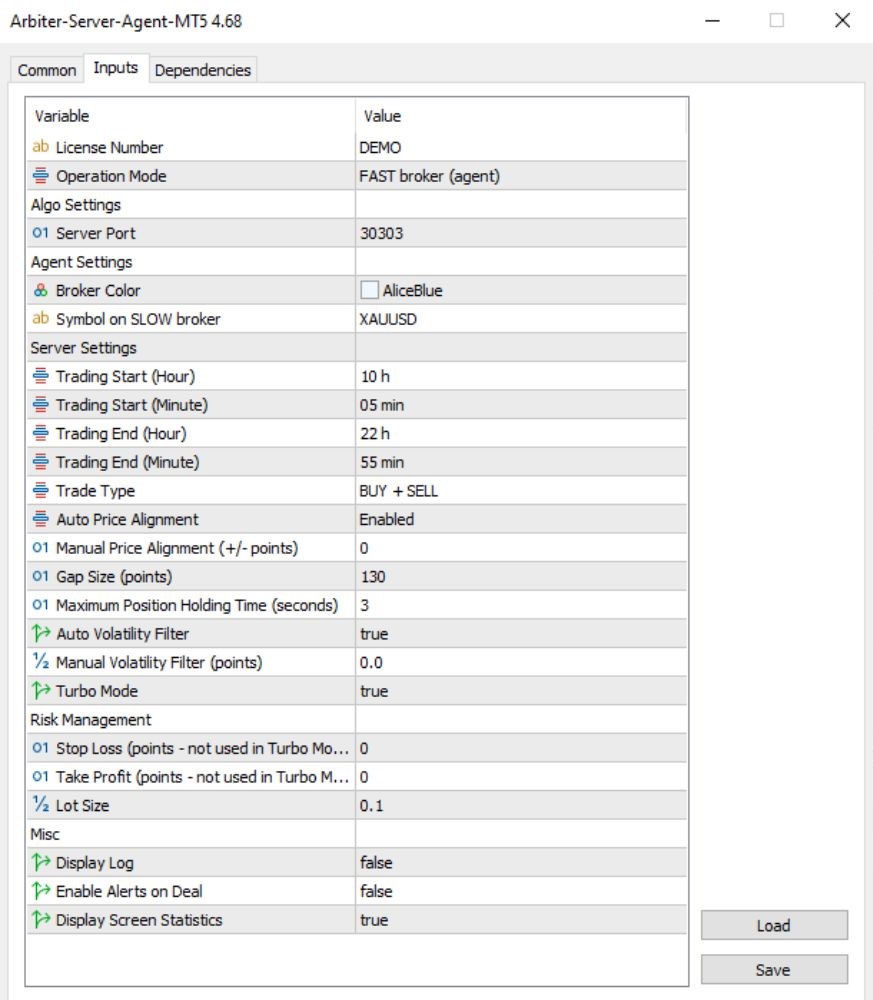
General information
- LicenseNumber: DEMO
→ Trial version. This is not an official licensed copy. - Operation Mode: FAST broker (agent)
→ Runs on a fast broker (with quicker price updates). This is an agent server and must synchronize with a client agent.
Server Settings
- TradingStartEnd: 10:05 – 22:55
→ Prevents the time window for EA to trade on a given day. - TradeType: BUY + SELL
→ buying again and selling are allowed. - AutoPriceAlignment: Enabled
→ Automatically adjusts price difference between fast and slow brokers. - ManualPriceAlignment: 0
→ Not used. Kindly note that if manually set, this value would be added/removed in order to adjust price discrepancy. - GapSize (points): 130
→ EA will take positions when price gap is ≥ 130 points. (Try using this value and adjust it according to the broker.) - MaxPositionHoldingTime (seconds): 3 seconds
→ Trade holding time is maximum 3 seconds — very suitable for scalping/arbitrage trading. - AutoVolatilityFilter: true
→ EA will trade based on proper market volatility conditions. - ManualVolatilityFilter: 0.0
→ No manual setting of volatility level.
Risk Management
- StopLoss: 0
→ No Stop Loss used in Turbo Mode — very high risk in case of a network malfunction or slippage. - TakeProfit: 0
→ No time or otherwise predefined Take Profit — trades are closed according to internal logic. - LotSize: 0.1
→ Default trade size. Must be calibrated in relation to account equity.
Miscellaneous
- DisplayLog: false
→ Do not display log messages on screen. - EnableAlertsOnDeal: false
→ No alert pop-ups when a trade is executed. - DisplayScreenStatistics: true
→ Show real-time performance statistics on the screen.
Key Takeaways
- Automated Trading: Streamlines the forex trading process by autonomously detecting and executing on lucrative arbitrage openings.
- Personalized Strategies: Provides adaptable options such as stop-loss, take-profit settings, and lot size customization to align with individual risk preferences.
- Low Latency: Delivers rapid trading execution, with speeds potentially reaching as little as 25 milliseconds, contingent upon the broker and hardware configuration.
- Cryptocurrency Support: Facilitates arbitrage trading for cryptocurrency CFDs, including Bitcoin, Ethereum, and Ripple, across different brokerage platforms.