









Blog
BONNITTA EA MT4 – Full Input Settings Analysis

Bonnitta EA is a professional expert adviser only created for MetaTrader 4, and only created to automate forex trading activity. Operating on a Pending Position strategy (PPS)-based operation and supported by an expertly designed proprietary algorithm for trading, it executes trades exactly. With the use of custom indicators, trendlines, and support/resistance levels, it uses a high-level method of making trading decisions. Backed by extensive testing over a full-scale 22-year historic database, its performance embodies high-level capability.
Buy BONNITTA EA product here
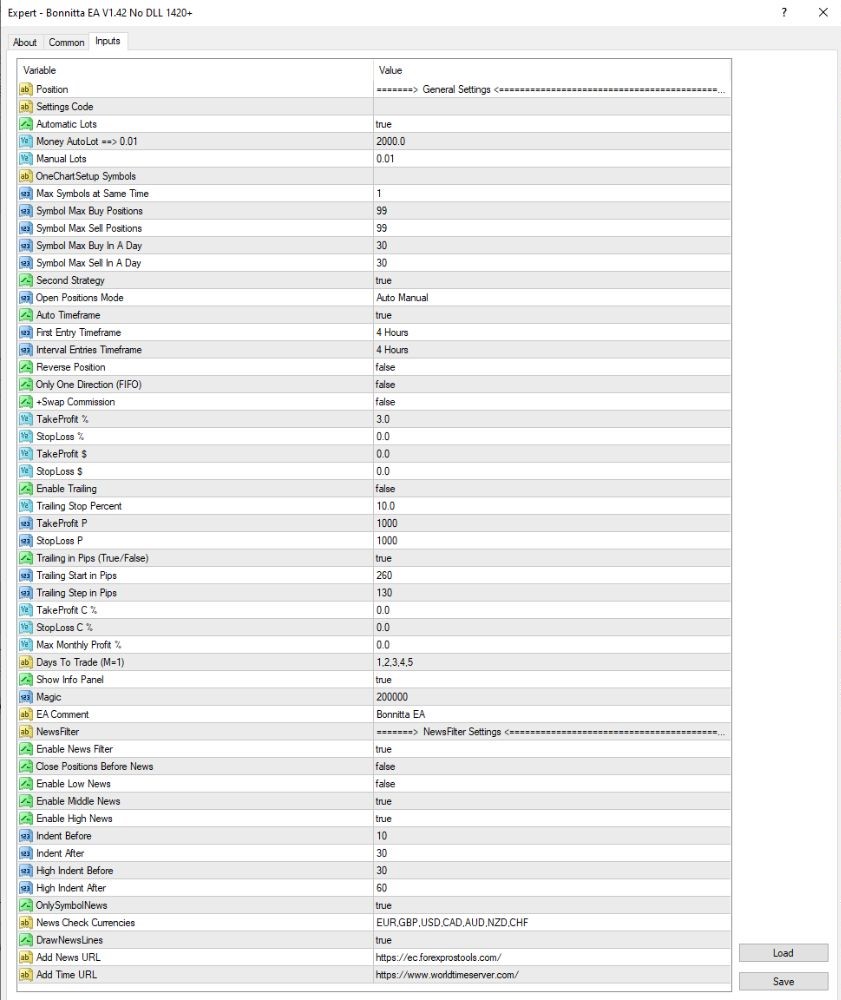
General Settings
- Automatic Lots: yes – EA automatically calculates lot size from balance in account
- Money per AutoLot (0.01): 2000.0 – 0.01 lot for every $2,000 balance
- Manual Lots: 0.01 – Used when automatic lotting is disabled
- Max Symbols at Same Time: 1 – Trades one symbol only at a time
- Symbol Max Buy/Sell Positions: 99 – up to 99 buy/sell orders per symbol are allowed
- Symbol Max Buy/Sell per Day: 30 – Limit to 30 buy or sell transactions per day
- Second Strategy: true – Second strategy is on
Timeframes and Trading Strategies
- Entry Time Window: 4 Hours – Entry time window to H4
- Reverse Position: false – Does not reverse on a losing trade
- Take Profit (%): 3.0 – Closes the trade with 3% profit
- Stop Loss (%): 0.0 – No SL as percentage points
- Take Profit / Stop Loss ($): 0.0 – No TP/SL as USD value
- Enable Trailing: false – Trailing stop off
- Trailing Stop / SL (pips): 1000 – Values set but not being used as trailing has been disabled
News Filter Settings
- Enable News Filter: true
→ Enables news filter feature. - Close Positions Before News: false
→ Avoids closing positions before news events. - Enable High News / Middle News: true
→ Avoids trading during medium and high-impact news. - Indent Before/After (medium/high news): 10–60 minutes
→ Avoids trading 10 minutes before medium news; 30 minutes before and after medium news;
→ 30 minutes before and 60 minutes after high-impact news. - OnlySymbolNews: true
→ Avoids only news on traded currency pairs. - New Check Currencies: EUR, GBP, USD, CAD, AUD, NZD, CHF
→ These currencies are monitored for any news events.
Key Takeaways
- Advanced Strategy: Bonnitta EA deploys the Pending Position Strategy (PPS) with unique indicators, trendline analysis, and its proprietary trading algorithm to execute sophisticated trade decisions.
- Multi-Asset Compatibility: Ranging from currency pairs to commodities and indices, Bonnitta EA effectively adapts to different markets for ensuring flexibility in terms of different asset classes.
- User-Friendly Interface: Easy to operate for both novice and experienced traders, the interface provides ease of use. Novice or experienced, focus on strategy optimization as the EA handles complexity of execution.
- Real-Time Performance Tracking: Stay informed and in the lead with real-time monitoring of your trading company to make adjustments in a timely manner for optimal performance.