









Blog
BONNITTA GOLD EA MT4 – Full Input Settings Analysis

Bonnitta Gold EA is a professional trading advisor (EA) for MetaTrader 4 and MetaTrader 5 terminals. The EA employs the in-house custom indicator that is not disclosed to anyone—a secret—is used with a complex algorithm for identifying profitable setups in gold through XAUUSD. The EA makes its trades employing the Pending Position Strategy (PPS) and utilizes Custom Indicators, Trendline Support and Resistance Lines, and Price Action in making decisions. The moment it is loaded onto charts of a platform, it continuously scans forex markets for signals, opening and closing trades when it detects opportunities.
Buy BONNITTA GOLD EA product here
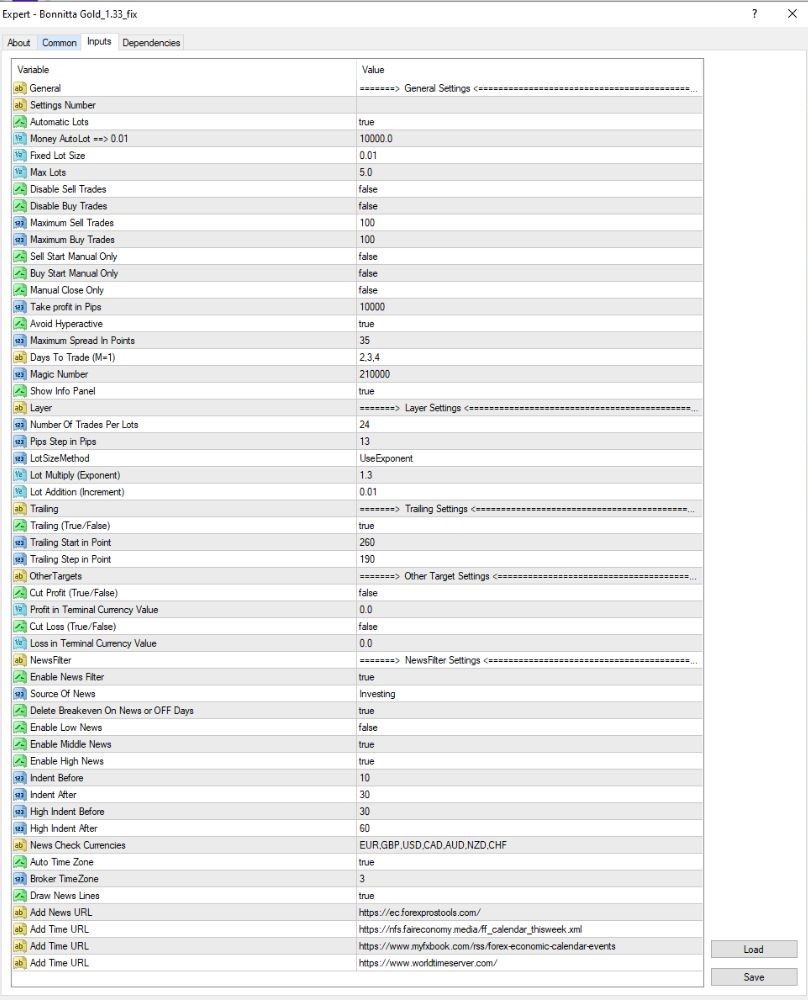
General Settings
- Automatic Lots: true
→ Trades with automatic lot size based on account balance. - Money per AutoLot (=> 0.01): 10000.0
→ Exchanges 0.01 lots for every $10,000 account balance. - Fixed Lot Size: 0.01
→ Applied when automatic lot size is disabled. - Max Lots: 5.0
→ Limits total lot size to a maximum of 5 lots. - Disable Sell/Buy Trades: false
→ Both BUY and SELL trades are allowed. - Maximum Sell/Buy Trades: 100
→ Maximum of 100 trades of each type (Buy/Sell). - Buy/Sell Start Manual Only: false
→ No need for manual start of trade. - Manual Close Only: false
→ Automatically close the trades by EA. - Take Profit in Pips: 1000
→ Take profit is 1000 pips. - Avoid High Spread: true
→ Do not make trades during high spread. - Maximum Spread: 35 points
→ Do not make any trade if the spread is more than 3.5 pips. - Days To Trade: 2,3,4
→ No other trade except on Tuesday, Wednesday, and Thursday. - Magic Number: 210000
→ Personal identifier of this EA’s trades. - Show Info Panel: true
→ Display EA information on the chart.
Layer Settings
- Trades per Lots: 24
→ Trade layers with lot size. - Step in Pips: 13
→ Trade layer step is 13 pips. - Lot Size Mode: UseExponent
→ Using exponential mode of lot sizing. - Lot Multiply (Exponent): 1.3
→ Every layer is multiple of previous lot by 1.3. - Lot Addition (Increment): 0.01
→ Or adding 0.01 lots for each layer if not exponent.
News Filter Settings
- Enable News Filter: true
→ Enables news filtering feature. - Source of News: Investing
→ Investing.com is used as the source of news. - Delete Breakeven On News / OFF Days: true
→ Discards breakeven trades when major news occurs or it’s a trading holiday. - Enable Low/Middle/High News: false / true / true
→ Does not employ low-impact news, does not trade medium and high-impact news. - Indent Before/After (news): 10–60 minutes
→ Does not trade from 10 minutes before to 60 minutes after news events. - Coins Tracked for News: EUR, GBP, USD, CAD, AUD, NZD, CHF
→ The coins are tracked for related news events.
Key Takeaways
- Bonnitta Trading Indicator: This house-owned indicator, created by the system developers, is instrumental in identifying successful trades.
- Hidden Custom Indicator: This private indicator boosts the decision-making ability of the EA.
- Advanced Trading Algorithm: These are all built in with the goal of maximizing trade entrances and exits.