









Blog
EVOTRADE EA MT4 – Full Input Settings Analysis

EvoTrade EA is a strong Forex trading system based on AI-driven analysis and automation. It employs adaptive risk management, trailing stop approach, and percentage money management to ensure maximum profitability. EvoTrade EA has been developed to sustain long-term success by achieving maximum returns with stringent risk controls.
Buy EVOTRADE EA product here
Money Allocation Settings
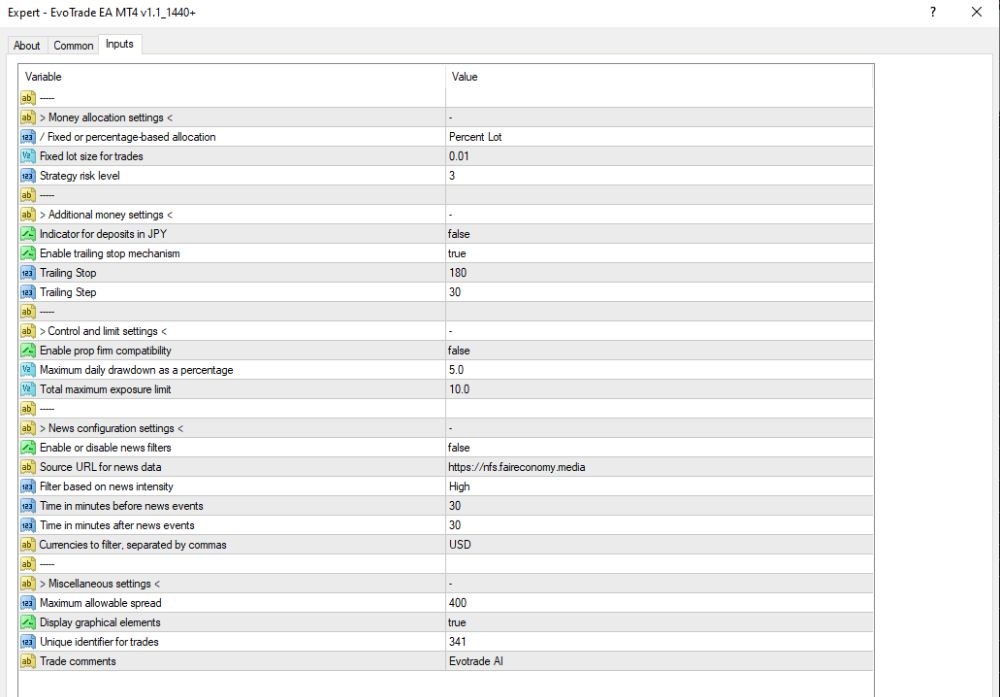
- Fixed or Percentage-Based Allocation: Percent Lot – Allocates based on percentage-based lot sizing.
- Fixed Lot Size for Trades: 0.01 – The fixed lot size is 0.01.
- Strategy Risk Level: 3 – Strategy risk level is 3 (medium to moderately high risk).
Additional Money Settings
- Deposit JPY Indicator: false – Deposit mode for JPY is disabled (exclusive for accounts with base currency JPY).
- Enable Trailing Stop Mechanism: true – Trailing stop is enabled in an effort to modify SL as price moves in the correct direction.
- Trailing Stop: 180 – Trailing stop level is at 180 points.
- Trailing Step: 30 – Trailing stop will be adjusted in 30-point increments.
News Configuration Settings
- Enable or Disable News Filters: true – News filtering is on (in an effort to avoid trading during high-impact news).
- Source URL for News Data: https://nfs.faireconomy.media – News data is pulled from this source (Forex Factory API).
- News Intensity Filter: High – Filtering will take place only for high-impact news.
- Time before News Events (minutes): 30 – Trading is suspended 30 minutes before news events.
- Time Post News Events (minutes): 30 – Resumption of trading is 30 minutes post news events.
- Currencies to Filter (comma-separated): USD – news concerning the USD alone will initiate a pause.
Miscellaneous Settings
- Maximum Allowable Spread: 400 – The maximum spread that is allowable is 400 points (i.e., 4 pips).
- Show Graphical Elements: true – Graphical elements will be shown on the chart.
- Unique Identifier for Trades: 341 – Trade ID to identify different trades when trading with more than one EA.
- Trade Comments: Evotrade AI – Every trade will have the following comment: “Evotrade AI”.