









Blog
FLY HIGHER EA MT4 – Full Input Settings Analysis


Fly Higher EA is a MetaTrader 4 Expert Advisor (EA) which automates forex trading for the convenience of beginners. It utilizes advanced algorithms to produce and execute strategies for consistent, safe growth. It operates on a 15-minute timeframe and automatically handles all the trades, including Stop Loss and Take Profit levels, without any manual intervention.
Buy FLY HIGHER EA product here
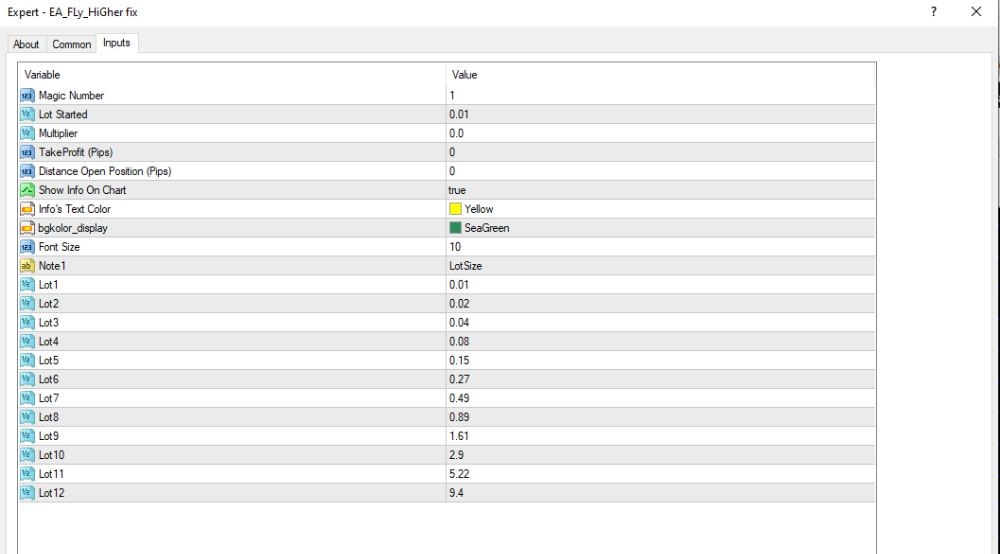
General settings & interface
- Magic Number: 1 → To distinguish trades from other Expert Advisors (EAs).
- Lot Started: 0.01 → Very tiny first lot size.
- Multiplier: 0.0 → Auto lot multiplier off (Martingale is OFF by default).
- Take Profit (Pips): 0 → No constant TP (may be closed manually or by personal logic).
- Distance to Open Position (Pips): 0 → Entry distance zero — used for manual trades or personal signals.
- Show Info On Chart: true → Produces trade information right on the chart.
- Info Text Color: Yellow, Background: SeaGreen → User interface color scheme.
- Font Size: 10 → Chart info font size shown.
Overview
- Strategy: Semi-automated Grid/Martingale
- Lot Management: User-defined lot size per level
- Take Profit / Stop Loss: Not pre-set — can be controlled manually or via external logic
- Risk Level: High if trades hit Lot 10–12
- Recommendation: Implement with large accounts (over $3,000). It is suggested to limit to a maximum of 5–6 trades to control drawdown.
Key Takeaways
- Strategy and Platform: Fly Higher EA utilizes a hedge scalper strategy to track the trend and react to price movements on a 15-minute time basis. It is supported by the MetaTrader 4 platform.
- Automated Risk Management: EA automatically puts SL and TP orders, a trailing SL and TP function to make sure the trade is handled according to market trends.
- Compatibility and Performance: Fly Higher EA is compatible with any broker as well as account type but using a VPS is recommended for optimum performance.