









Blog
FOREX JUPITER EA MANAGER + INDICATOR MT4 – Full Input Settings Analysis


Forex Jupiter EA is a highly dependable trend indicator that combines required Forex trading strategies to maximize trading into a focal point of income. The program was made by Oliver Murphy, the CEO of Altra Forex. It combines support and resistance methods with an outrageously accurate trend-following system. The intention of this EA is to change the way people trade by making trading a core and reliable source of income. Forex Jupiter is a safe and advanced tool in the dynamic Forex market situation.
Buy FOREX JUPITER EA product here
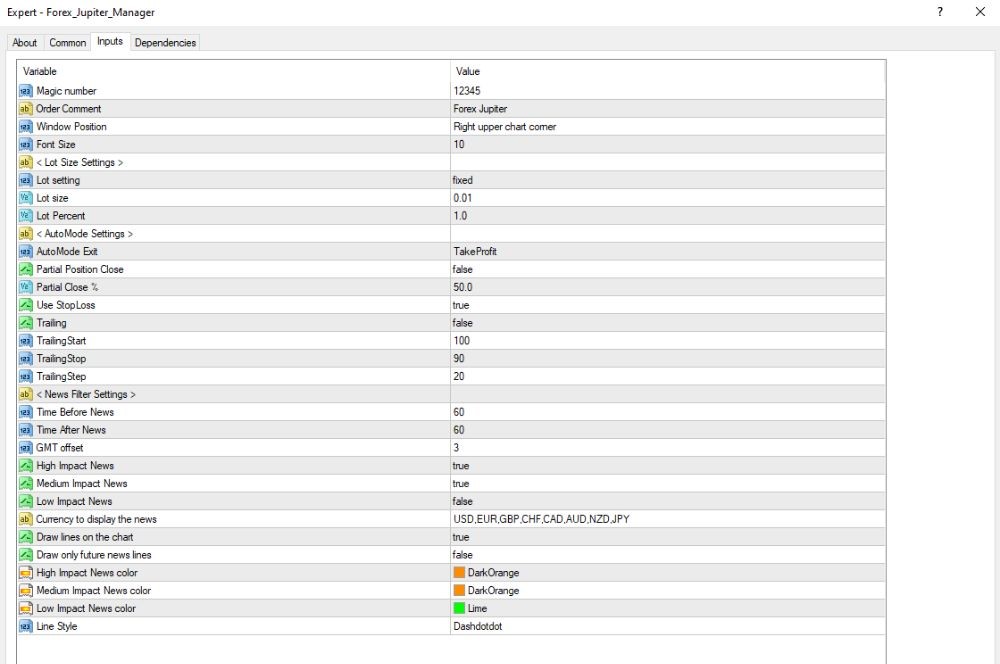
General settings & order management
- Magic Number
The magic number is assigned as 12345 and helps the EA recognize its own deals and prevent collision with other EAs. - Order Comment
All trades will include a comment “Forex Jupiter” to follow easily and handle. - Interface Position
The EA’s interface is placed at top right of chart (Window Position = Right upper chart corner). - Font Size
Screen text is with font size 10 to display easily and legibly.
Lot settings & management mode
- Lot Setting
The EA uses fixed lot size (Lot setting = fixed). - Lot Size
All orders are opened in 0.01 lots (Lot size = 0.01). - Lot Percent
1.0, a parameter that would manage lot size in auto mode, but deactivated because the lot setting is fixed (Lot Percent = 1.0). - Auto Mode Settings
- Exit Condition
The trades will automatically close when it reaches the Take Profit level (AutoMode Exit = TakeProfit). - Partial Close
Partial closure of positions is turned off (Partial Position Close = false).
When starting up, the position would close 50 percent on trigger levels (Partial Close % = 50.0). - Stop Loss Usage
Stop Loss is enabled, helping to protect capital (Use StopLoss = true).
- Exit Condition
Trailing Settings & News Filtering
- Trailing Stop Settings
- Trailing Stop is disabled (Trailing = false).
- Trailing Start is 100 pips – trailing will begin once profit reaches 100 pips in case trailing is enabled (TrailingStart = 100).
- Trailing Stop Distance is 90 pips – Stop Loss will trail the price by 90 pips (TrailingStop = 90).
- Trailing Step is 10 pips – the Stop Loss will be moved 10 pips in the direction of price movement (TrailingStep = 10).
- News Filter Settings
- Pause Before News: Trading is prevented 60 minutes before planned news releases (Time Before News = 60 minutes).
- Pause After News: Trading resumes 60 minutes after the release (Time After News = 60 minutes).
- GMT Offset is 3, which syncs news time with your server/broker (GMT offset = 3).
- News Impact Filtering:
- High-impact news: Enabled (High Impact News = true)
- Medium-impact news: Enabled (Medium Impact News = true)
- Low-impact news: Disabled (Low Impact News = false)
- Monitored Currencies: USD, EUR, GBP, CHF, CAD, AUD, NZD, JPY.
- Chart Display Settings
- News Lines on Chart: Enabled (Draw lines on the chart = true).
- Only Future News Lines: Enabled – only future news events are displayed (Draw only future news lines = true).
- Line Colors:
- High & Medium Impact: DarkOrange
- Low Impact: Lime
- Line Style: Dotted (Line Style = Dot)
Key Takeaways
- Easy to Navigate and Easy to Use:
Easy-to-use platform with simple navigation.
Guaranteed to be easily accessed by all beginners, professionals, and everyone in between. - Record of Success Proven:
Backed by a proven record of success, high profits looking back on reliability.
To profit on a number of timeframes, guaranteed to deliver consistently. - Combination of Old and AI Techniques:
Old Forex techniques merged with sophisticated Artificial Intelligence.
Algorithmic accuracy utilized to trade strategy effectively optimize. - Generation of Income Possible:
Provides a real chance to make Forex trading a primary source of income.
offers a chance to open a door to stable and huge profits on the Forex market.