









Blog
Forex Trading Simulator: Master Currency Trading Without Risking Real Money


Have you ever wondered how professional traders develop their skills without losing thousands of dollars in the learning process? The answer lies in forex trading simulators – powerful tools that replicate real market conditions while protecting your capital. Whether you’re a complete beginner taking your first steps into currency trading or an experienced trader testing new strategies, understanding how to effectively use trading simulators can dramatically accelerate your journey to profitability.
What Is a Forex Trading Simulator?
A forex trading simulator is a software application that mimics the live foreign exchange market environment, allowing traders to practice buying and selling currencies without using real money. Think of it as a flight simulator for traders – just as pilots train in realistic cockpits before flying actual planes, traders can hone their skills in risk-free virtual markets.
These simulators use historical market data or real-time price feeds to create an authentic trading experience. You’ll see the same price movements, experience similar market volatility, and face identical trading challenges as you would in live markets – but with one crucial difference: your mistakes won’t cost you real money.
Why Every Trader Needs a Trading Simulator
According to research from Investopedia, approximately 90% of forex traders lose money in their first year. This shocking statistic often results from inadequate preparation and jumping into live trading too quickly. Here’s why using a simulator first is essential:
1. Risk-Free Learning Environment
The most obvious benefit is the ability to learn without financial risk. When you’re starting out, you’ll make countless mistakes – from entering positions at the wrong time to forgetting to set stop losses. In a simulator, these errors become valuable learning experiences rather than costly disasters.
2. Strategy Development and Testing
Professional traders never implement a new strategy without extensive backtesting. Simulators allow you to test your trading ideas across different market conditions and timeframes. You can experiment with various approaches – from scalping to swing trading – and discover what works best for your personality and schedule.
3. Emotional Control Training
Trading psychology plays a massive role in success. While simulator trading doesn’t replicate the exact emotions of risking real money, it helps you develop discipline and practice following your trading plan without emotional interference.
Key Features to Look for in a Forex Trading Simulator
Not all trading simulators are created equal. Here are the essential features that separate professional-grade simulators from basic practice platforms:
| Feature | Why It Matters | What to Look For |
|---|---|---|
| Real Market Data | Ensures realistic trading conditions | Historical tick data, real-time price feeds |
| Multiple Timeframes | Allows testing different trading styles | M1 to Monthly charts available |
| Order Types | Practice with all trading tools | Market, limit, stop, trailing stops |
| Technical Indicators | Develop analysis skills | 50+ indicators minimum |
| Performance Analytics | Track progress and identify weaknesses | Detailed statistics, equity curves, win rates |

Step-by-Step Guide: Getting Started with a Forex Trading Simulator
Ready to begin your simulation trading journey? Follow this comprehensive guide to maximize your learning experience:
Step 1: Choose Your Trading Platform
The most popular trading platform for forex simulation is MetaTrader 4 (MT4) or MetaTrader 5 (MT5). These platforms offer built-in strategy testers that function as excellent simulators. For MT4 users, check out our collection of Expert Advisors for MT4 that can enhance your simulation experience.
Step 2: Set Up Your Demo Account
Most forex brokers offer free demo accounts with virtual funds. Here’s how to set one up:
- Visit your chosen broker’s website
- Click on “Open Demo Account”
- Fill in your basic information
- Download the trading platform
- Log in with your demo credentials
Step 3: Configure Your Trading Environment
Before placing your first trade, properly set up your workspace:
- Chart Layout: Arrange multiple timeframes for comprehensive analysis
- Indicators: Add your preferred technical indicators
- Trading Capital: Start with the same amount you plan to trade live
- Risk Parameters: Set realistic leverage and position sizes
Pro Tip: Treat your demo account exactly as you would a real account. This means using the same starting capital, position sizes, and risk management rules you’ll apply when trading live.
Step 4: Develop Your Trading Plan
A trading plan is your roadmap to success. Document the following elements:
- Trading Strategy: Define your entry and exit rules
- Risk Management: Maximum risk per trade (typically 1-2% of account)
- Trading Schedule: When you’ll analyze markets and place trades
- Performance Goals: Realistic profit targets and drawdown limits
Advanced Simulation Techniques for Experienced Traders
If you’re already familiar with basic trading concepts, these advanced simulation techniques can take your skills to the next level:
1. Market Replay Trading
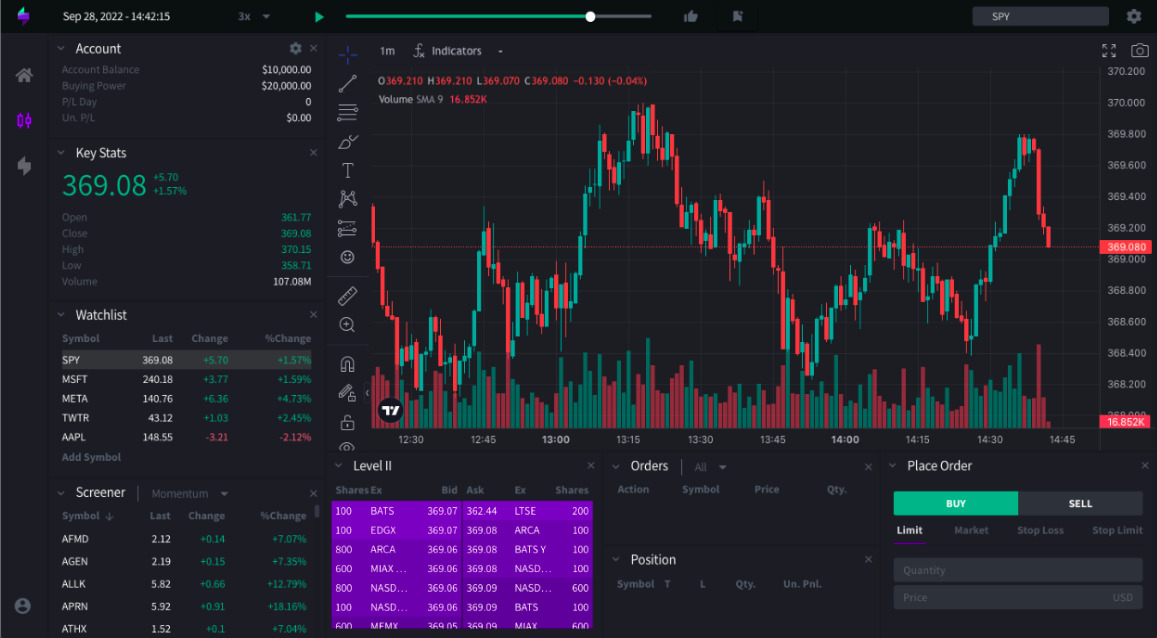
Market replay allows you to “rewind” the market and trade historical price action as if it were happening in real-time. This feature, available in platforms like TradingView, lets you practice specific market conditions repeatedly until you master them.

2. Multi-Timeframe Analysis Practice
Professional traders rarely rely on a single timeframe. Use your simulator to practice analyzing:
- Monthly/Weekly: Identify major trends and support/resistance levels
- Daily/4-Hour: Spot trading opportunities aligned with the bigger picture
- 1-Hour/15-Minute: Time your entries with precision
3. News Trading Simulation
Economic news releases can cause significant market volatility. Practice trading around major announcements like:
- Non-Farm Payrolls (NFP)
- Interest rate decisions
- GDP releases
- Central bank speeches
For automated news trading strategies, explore our MT5 Expert Advisors designed to handle high-volatility events.
Common Mistakes to Avoid When Using Trading Simulators
While simulators are invaluable learning tools, certain pitfalls can limit their effectiveness:
1. Treating It Like a Game
The biggest mistake is not taking simulation trading seriously. When there’s no real money at risk, it’s tempting to take excessive risks or abandon your trading plan. Remember: you’re building habits that will carry over to live trading.
2. Ignoring Realistic Trading Conditions
Many beginners use unrealistic account sizes or leverage in their simulations. If you plan to start live trading with $1,000, don’t practice with a $100,000 demo account. The psychological difference is enormous.
3. Skipping the Learning Process
Some traders rush through simulation trading, eager to start making real money. According to Malcolm Gladwell’s 10,000-hour rule, mastery requires extensive practice. While you don’t need 10,000 hours of simulation, spending less than 3-6 months is often insufficient.
Transitioning from Simulator to Live Trading
When should you make the leap to real money trading? Look for these signs of readiness:
Consistent Profitability
You should demonstrate at least 3-6 months of consistent profits in your simulator. This doesn’t mean winning every trade, but showing positive results over time while following your trading plan.
Emotional Stability
Can you handle losing streaks without abandoning your strategy? Do winning trades make you overconfident? Emotional control in simulation is a prerequisite for live trading success.
Statistical Edge
Analyze your simulation results thoroughly:
| Metric | Minimum Target | Ideal Target |
|---|---|---|
| Win Rate | 45% | 55%+ |
| Risk/Reward Ratio | 1:1.5 | 1:2 or higher |
| Maximum Drawdown | 20% | 10% or less |
| Profit Factor | 1.2 | 1.5+ |
Recommended Forex Trading Simulators
Here are the top simulators recommended by professional traders:
1. MetaTrader 4/5 Strategy Tester
Best for: Traders who want to use the same platform for simulation and live trading
Key Features: Real tick data, Expert Advisor testing, multiple timeframes
Cost: Free with demo account
2. TradingView Paper Trading
Best for: Chart analysis enthusiasts and social traders
Key Features: Advanced charting, community features, strategy backtesting
Cost: Free basic version, paid upgrades available
3. Forex Tester
Best for: Serious students wanting accelerated learning
Key Features: Speed control, detailed statistics, strategy optimization
Cost: One-time purchase (around $300)
Integrating Automated Trading into Your Simulation
Once you’ve mastered manual trading in the simulator, consider exploring automated strategies. Expert Advisors (EAs) can execute trades based on predefined rules, removing emotional decision-making from the equation.
Start by testing proven EAs in your simulator before risking real capital. Our complete collection of trading robots includes detailed backtesting results and optimization guides to help you get started.
Conclusion: Your Path to Trading Success
A forex trading simulator is more than just a practice tool – it’s your laboratory for developing the skills, discipline, and confidence needed for successful trading. By following the strategies outlined in this guide and committing to deliberate practice, you’re setting yourself up for long-term success in the forex markets.
Remember these key takeaways:
- Treat simulation trading as seriously as live trading
- Focus on developing a consistent, profitable strategy
- Track your performance metrics meticulously
- Don’t rush the transition to live trading
- Continue using simulators to test new strategies even after going live
The forex market offers incredible opportunities for those who approach it with proper preparation. By mastering your skills in a risk-free environment first, you’re joining the small percentage of traders who take the time to build a solid foundation for success. Start your simulation journey today, and transform yourself from a novice into a confident, profitable forex trader.
Ready to take the next step? Explore our selection of professional forex indicators to enhance your technical analysis during simulation trading. Remember, the tools you use in practice should be the same ones you’ll rely on when trading live.