









Blog
FUNDEDEA QUANTUM MT4 – Full Input Settings Analysis


Fundedea Quantum is a fully automated trading robot designed to execute trades with utmost accuracy and the most advanced technical strategies. This expert advisor is developed specifically to conquer the Prop company challenges, for example, FTMO, MyFundedfx and FundedNext. It will perform best on the Metatrader 4 trading platform. Automating these highly complex trading strategies and operating strictly under the command of Prop, Fundedea quantum companies. Multi -chemical promising potential of traders in these high stocks.
Buy FUNDEDEA QUANTUM product here
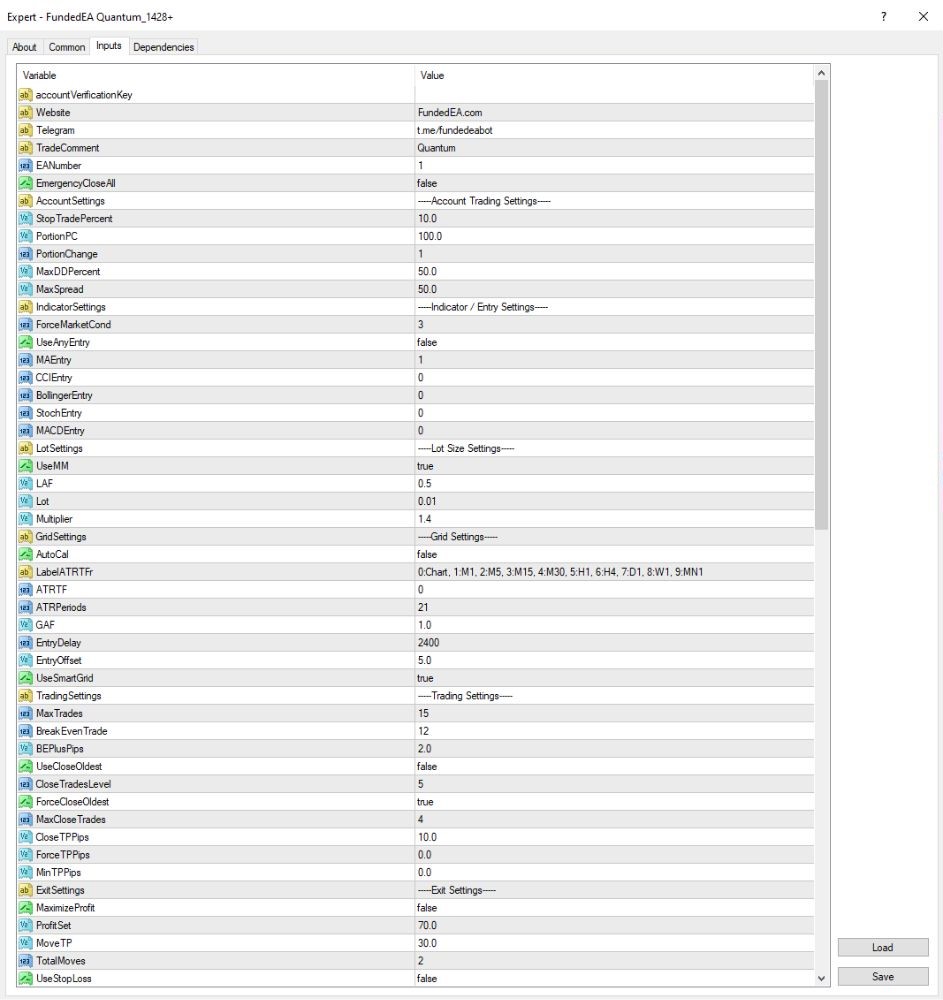
Account settings & capital management
- Money Management:
- UseMM = true → Auto money management is on.
- LAF = 0.5, Lot = 0.01 → Minimum base lot with minimum lot adjustment factor.
- Multiplier = 1.4 → Lot size multiplication by 1.4 during averaging down.
- Entry Conditions:
- MAEntry = 1 → Trades are entered according to Moving Average (MA) signals.
- All the other indicators (CCI, Bollinger Bands, Stochastic, MACD) are turned off.
- Market Conditions:
- FreeMarketCond = 3 → Traded under certain market conditions.
- MaxSpread = 50 → Accepts relatively wide spreads.
- Entry Timing:
- EntryDelay = 2400 ms → Entrances of trades at least 2.4 seconds delayed.
Grid setup & open/close orders
- Grid Setup:
TotalMoves = 2 → Maximum of 2 averaging steps at most.
AddGrid = false → No additional grid trades beyond stated conditions.
Supports multi-timeframe analysis (M1, M5, M15, etc.). - Trade Limits:
MaxTrades = 15, BreakEvenTrade = 12 → Limits number of opened trades and breaks even on the 12th trade. - Trade Closing:
ForceCloseOldest = true → Closes the oldest opened trade automatically.
CloseTPPips = 10 → Trades can be closed individually when profit is 10 pips. - Take Profit:
ProfitSet = 70 → Closes all orders upon achieving a total profit of $70.
MaximizeProfit = false → Does not attempt to maximally maximize profit when it reaches the target. - Stop Loss:
UseStopLoss = false → Strong stop loss is now disabled.
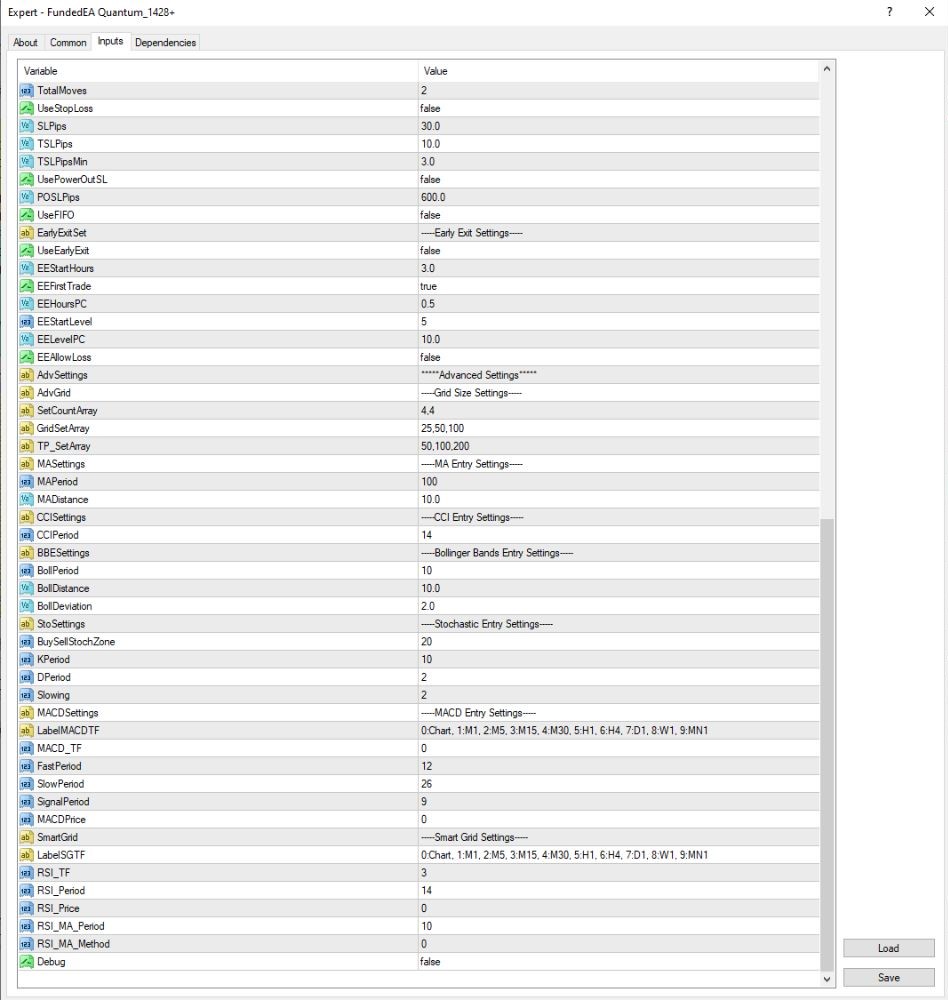
SLPips = 30 → If activated, stop loss at 30 pips.
Advanced settings and indicators
- MA Settings:
MAPeriod = 100, MADistance = 10 → Entry period and distance of Moving Average. - Other Indicators:
CCI, Bollinger Bands, Stochastic, and MACD settings are pre-configured but not activated. - Advanced Grid:
AdvGrid = true → Enables advanced grid trading logic.
GridSetArray = 25, 50, 100 → Grid levels at 25, 50, and 100 pips.
TP_SetArray = 50, 100, 200 → Take profit targets at 50, 100, and 200 pips. - Smart Grid & Debug:
SmartGrid = false ⇒ Smart grid feature is switched off.
Debug = false ⇒ Normal operation mode; no detailed log records are maintained.
Key Takeaways
- FundedEA Quantum is a professional trader advisor for Gold, also known as XAUUSD, and should be executed on the MetaTrader 4 trading platform. It will make your funded accounts’ trades smooth and problem-free.
- EA compatible with major prop firms such as FTMO, MyFundedFX, and FundedNext operates according to their trading criteria.
- The strategy utilizes one accessible trade at a time, Martingale, HFT, Grid strategies evol., clear SL and TP set for obvious risk control.