









Blog
FX GALAXY EA MT4 – Full Input Settings Analysis

FX Galaxy EA MT4 is a multi-faceted trading robot created for professional forex traders. The Expert Advisor automatically employs support and resistance levels, trend detection, as well as volume indicators to identify and execute trades within the forex market. Created for utilization on the MetaTrader 4 platform, the EA presents a wide array of tools and strategies specially crafted to meet the needs of professional forex traders. It is available for free download and delivers cutting-edge features and functionality to cater to professional traders.
Buy FX GALAXY EA product here
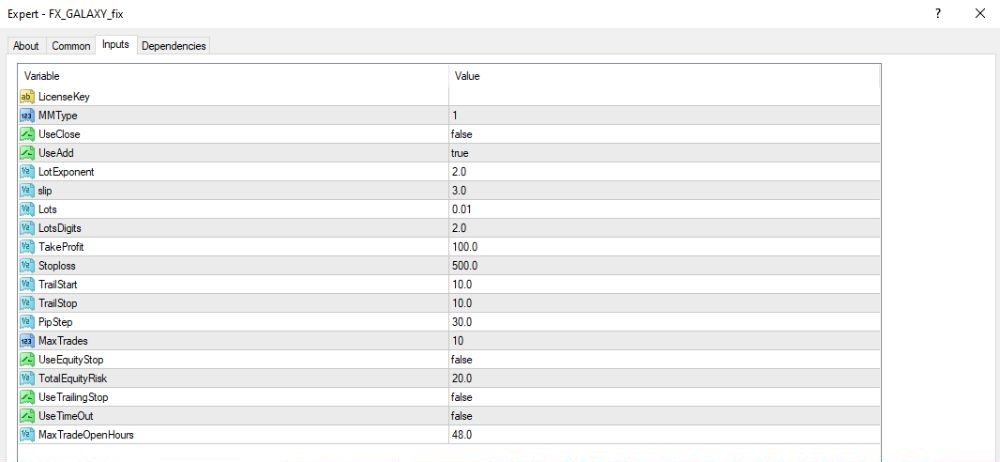
Set up capital management & order entry
- Money Management Type:
- MMType = 1 → EA employs money management mode 1 (typically fixed lot or simple strategy).
- Lots Settings:
- Lots = 0.01, LotsDigits = 2 → Typical regular lot size of 0.01 with 2 decimal precision digits.
- LotExponent = 2.0 → Exponential growing of lot 2 times during adding positions.
- Trade Management:
- UseAdd = true → Permits additional entries for averaging (for example, recovery or grid orders).
- UseClose = false → EA will not close all trades auto based on custom logic.
Risk management and take profit/stop loss
- Trade Parameters:
TakeProfit = 100.0 → Take Profit will be activated by default at 100 pips.
StopLoss = 500.0 → Stop Loss will be activated by default at 500 pips. - Trailing Stop Settings:
TrailStart = 10.0 → Trailing Stop will be activated when profit is 10 pips.
TrailStop = 10.0 → Trailing Stop will trail 10 pips behind the price. - Order Spacing & Limits:
PipStep = 30.0 → Minimum mean order distance is 30 pips.
MaxTrades = 10 → Maximum number of trades that can be opened at once is 10.
Additional settings & time limits
- Equity-Based Risk Management:
UseEquityStop = false → Equity stop is not active, EA won’t close trades by account equity.
TotalEquityRisk = 20.0 → Restricts total risk to 20% of the account equity if this is enabled. - Trailing Stop:
UseTrailingStop = true → Trailing stop is active to lock profits automatically. - Trade Time Management:
UseTimeOut = false → Closing of trades by time is inactive; EA won’t close trades forcibly after a time span.
MaxTradeOpenHours = 48.0 → The maximum time that can be left open for a trade is 48 hours.
Key Takeaways
- Completely Automated: Executes on its own, making trades based on pre-programmed rules without any human intervention.
- Multiple Currency Pairs: Executes trades on various forex pairs to get a diversified portfolio.
- Market Trend Following: Uses advanced methods to effectively follow and capitalize on market trends.
- Small Grids and Loss Limitation: Implements small grid approaches for risk management and mitigation of potential losses.
- Built-in News Filter: Includes a news filter in order to avoid unnecessary drawdowns during high-impact news announcements.