









Blog
GOLD SCALPING AI EA MT4 – Full Input Settings Analysis


Gold Scalping AI EA is an high-performance automatic trading system that is specifically made for the XAUUSD (Gold) currency pair on MT4. It uses AI-based analysis of a bunch of indicators to make very precise trades except for extremely risky approaches like martingale and grid. Each trade is secured by a stop loss for risk management. Being user-friendly in interface and in algorithms, it offers trustworthy and efficient solutions to the users.
Buy GOLD SCALPING AI EA product here
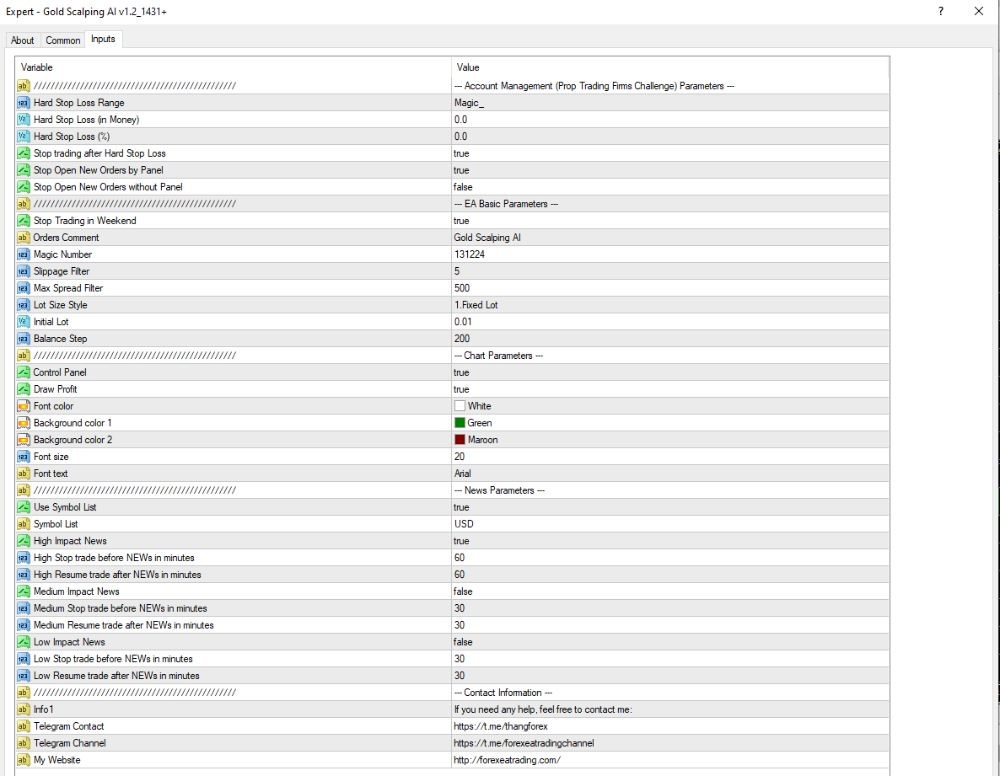
Capital and risk management
- Hard Stop Loss Range / In Money / In %: 0.0 – The EA does not maintain a fixed Stop Loss; the EA dynamically adjusts the risk.
- Stop Trading After Hard Stop Loss: true – EA will completely cease trading when the hard SL is reached.
- Stop Open New Orders by Panel: true – The control panel can be used to disable new order entries.
- Stop Open New Orders Without Panel: false – Manual order opening is prohibited.
- Max Spread Filter: 500 points – EA only trades when the spread does not exceed 500 points.
- Slippage Filter: 5 points – Slippage permitted is to maximize up to 5 points.
- Lot Size Style: Fixed Lot – Trades employ a fixed lot size strategy.
- Initial Lot: 0.01 – Trades have an initial size of 0.01 lots.
- Balance Step: $200 – In the case of every other $200 balance in an account, lot size can be added (depending on EA settings).
Trading Settings & Interface
- Orders Comment: Gold Scalping AI – Trade comment to distinguish orders opened by this EA.
- Magic Number: 1312324 – Individual number for this Expert Advisor to distinguish its trades.
- Control Panel: true – Simple visual control panel is enabled for manual live monitoring and control.
- Draw Profit: true – Live profit/loss are drawn directly on the chart.
- Interface Colors:
- Font: White
- Background 1: Green
- Background 2: Maroon
→ For easy and comfortable visual monitoring.
- Font Size: 20 – Large and clear text in the chart.
News & Time Management
- Stop Trading on Weekends: true
→ Automatically stops trading during the weekend to avoid low liquidity and erratic price movements. - Use Symbol List: true
→ Restricts trading to a defined list of symbols (e.g., USD pairs only), which raises strategy precision. - High Impact News – Stop/Resume:
→ Suspends trading 60 minutes prior to and resumes 60 minutes following high-impact economic news events to avoid volatility spikes. - Medium Impact News – Stop/Resume: false
→ No trading halt for medium-impact news. - Low Impact News – Stop/Resume:
→ Trading is suspended 30 minutes before and resumed 30 minutes after low-impact news releases.