









Blog
INFINITE STORM EA MT4 – Full Input Settings Analysis

Buy INFINITE STORM EA product here
Trading Settings & Risk Management
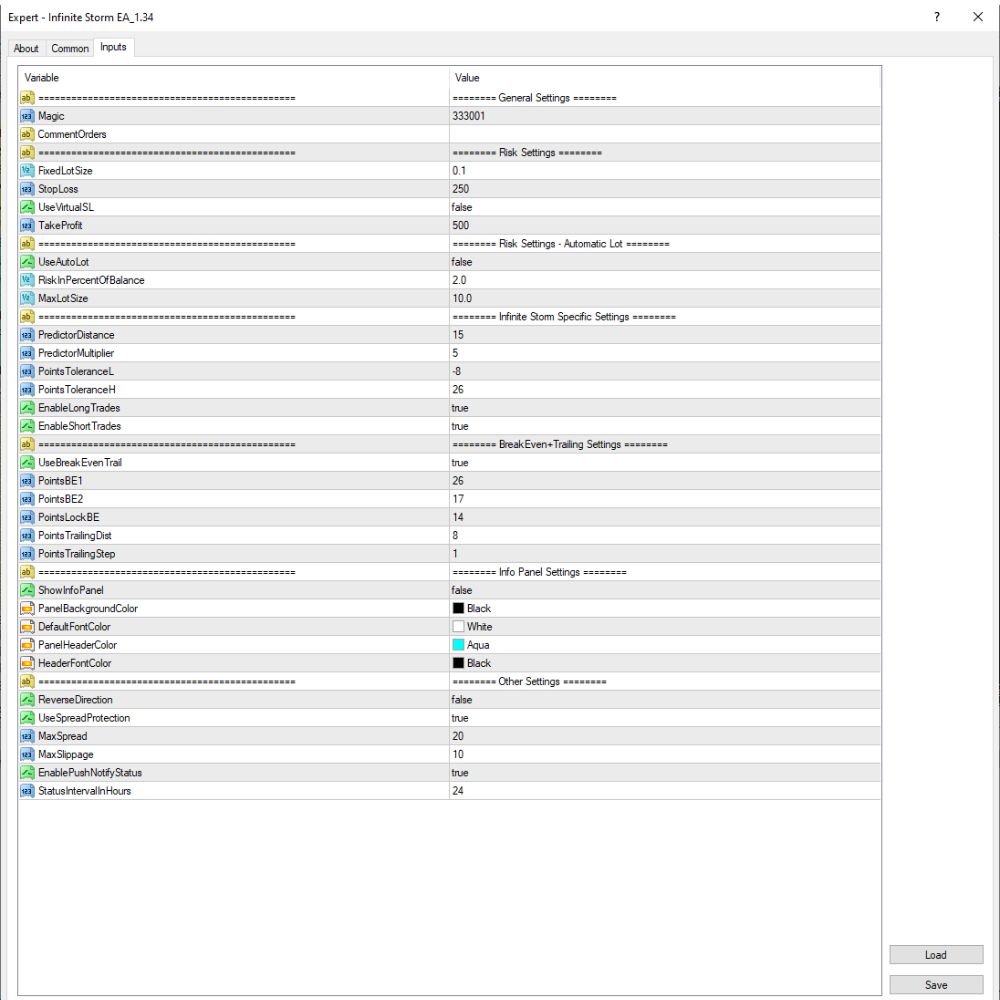
- Magic: 333001 – EA’s special identifier to avoid misunderstandings among different users.
- CommentOrders: “” – No comments are added to trade orders.
- FixedLotSize: 0.1 – Fixed lot size of 0.1 is applied in every trade.
- StopLoss: 250 – Stop loss is set as 250 points (according to broker settings for pips).
- TakeProfit: 500 – Take profit is set as 500 points.
- UseVirtualSL: false – Virtual stop loss is not used; real SL is used.
- UseAutoLot: false – Auto lot calculation is not utilized; fixed lot is used.
- RiskInPercentOfBalance: 2.0 – With AutoLot, risk per trade would be 2% of account balance.
- MaxLotSize: 10.0 – The maximum lot size per trade is limited to 10.0 lots.
Order management and trading strategies
- Infinite Storm Strategy (Predictor)
- PredictorDistance: 15 – The disparity between predicted signal levels.
- PredictorMultiplier: 5 – Multiplier of signal deviation.
- PointsToleranceL: -8 – Tolerance for long entries (negative allows signal overshoot).
- PointsToleranceH: 26 – Tolerance for short entries.
- EnableLongTrades: true – Allows long (buy) trades.
- EnableShortTrades: true – Allows short (sell) trades.
- Break-even & Trailing Stop Settings
- UseBreakEvenTrail: true – Enables both breakeven and trailing stop functionalities.
- PointsBE1 / BE2: 26 / 17 – Price must move 26 and then 17 points to trigger breakeven logic.
- PointsLockBE: 14 – Lock in 14 points of profit after breakeven is achieved.
- PointsTrailingDist: 8 – Trailing stop will be placed 8 points away from current price.
- PointsTrailingStep: 1 – Trailing stop will step 1 point each time the price moves ahead.
Other settings
- ReverseDirection: false – Do not reverse trade signals (only plain direction).
- UseSpreadProtection: true – Utilize spread protection to avoid entries during high spread periods.
- MaxSpread / MaxSlippage: 20 / 10 – Maximum spread to enable 20 points, slippage 10 points.
- EnablePushNotifyStatus: true – Push notifications are on (notifies mobile when trades or events occur).
- StatusIntervalHours: 24 – The EA’s status will update every 24 hours.