









Blog
JFX PROPFIRM PUNISHER EA MT4 – Full Input Settings Analysis


Buy JFX PROPFIRM PUNISHER EA product here
Trading & Order Management Settings
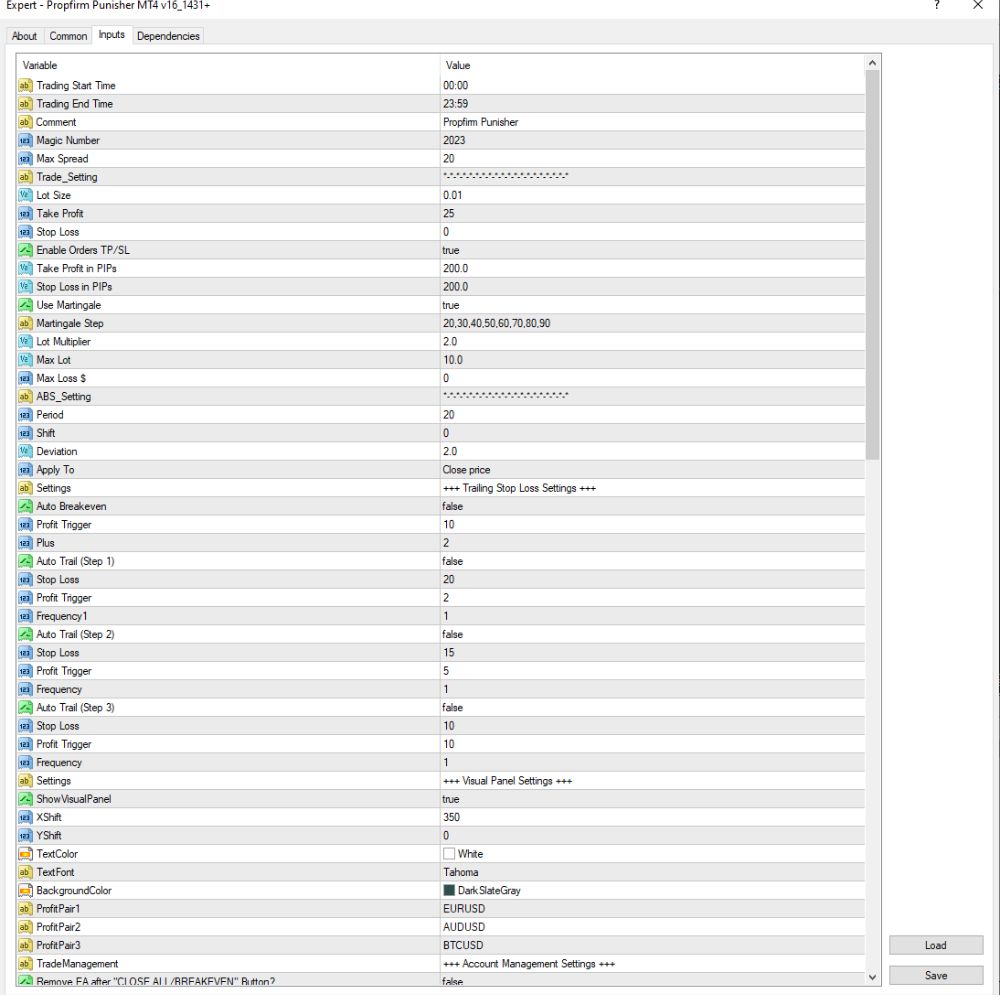
- Trading Time:
- Trading is from 00:00 and ends at 23:59, so the EA is operating nearly 24 hours a day.
- Trading is possible on any day of the week (Monday to Sunday) between 00:00 and 23:00.
- Lot Size & Spread Settings:
- Lot Size: 0.01 lots (initial trade size).
- Max Spread: 20 pips – the EA doesn’t trade when the spread exceeds 20 pips.
- Lot Multiplier: 2.0 – applied to increase the lot size after a loss (martingale approach).
- Max Lot: 10.0 – the EA will never execute this lot size.
- → This is doing a martingale approach to recoup losses by increasing the lot size incrementally.
- Take Profit & Stop Loss Settings:
- Take Profit: 25 pips.
- Stop Loss: 0 – no fixed stop loss (this is high risk).
- Take Profit in Pending Mode: 200 pips – used when pending orders are placed.
- Trailing Stop:
- There are three levels of trailing stop setup, but all are switched off (false) at the moment.
- Break-even Function:
- Disabled – the EA does not move the stop loss to break-even.
- Trade Management:
The EA is adapted to manage up to three major pairs:
EURUSD, AUDUSD, and BTCUSD.
Account & Risk Control Settings
- Capital & Risk Management
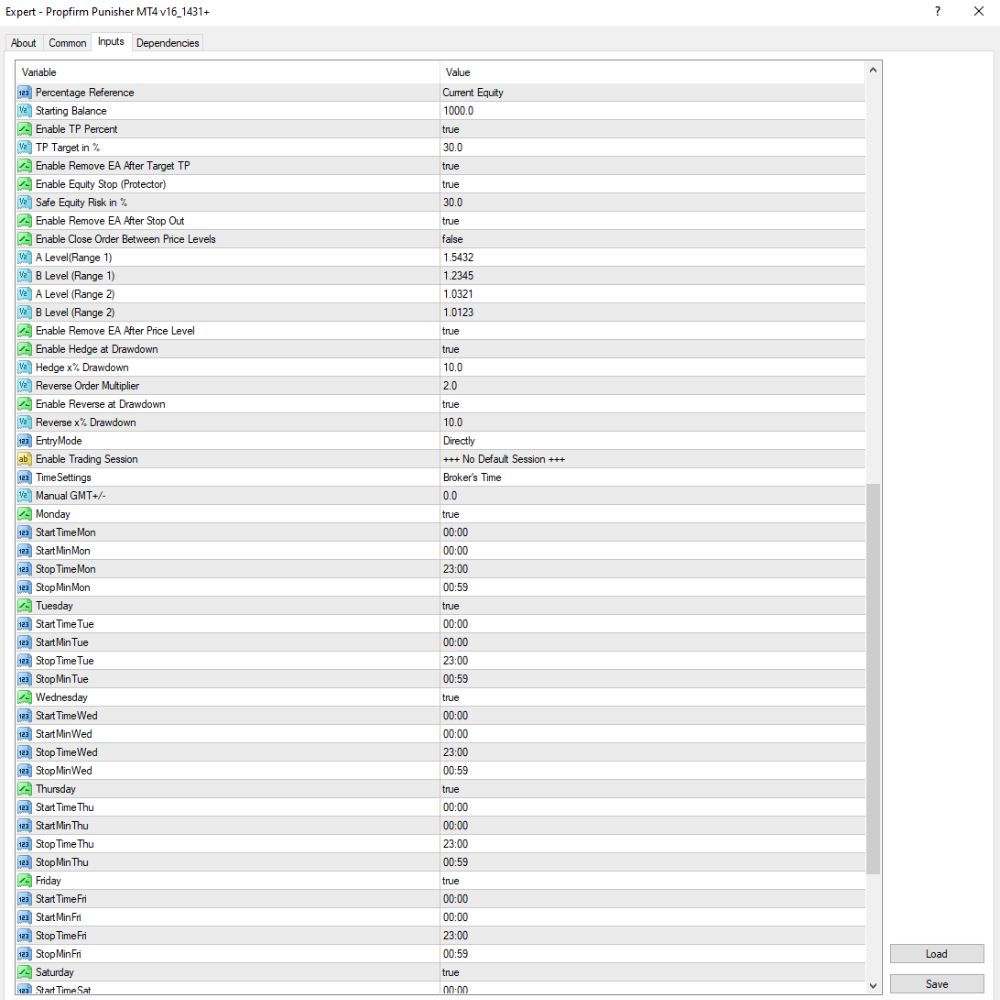
- Percentage Reference: Current Equity – All take profit or drawdown percentage-based computations are made on current equity, not balance.
- TP % Target: 30.0% – The EA will target a 30% profit in relation to equity before stopping or taking more drastic measures.
- Equity Stop: 30.0% – The EA will stop trading if equity drops by 30%.
- Max Loss ($): 1.0 – Dollar absolute maximum loss amount, above which the EA will stop.
- Enable Hedge at Drawdown: true – The EA will open hedging positions when drawdown reaches a critical level.
- Hedge ×2 Drawdown: 10.0 – Hedging is active when drawdown reaches 10%, and hedge size is double the first position.
- Reverse Order at Drawdown: true – The EA reverses order (opens opposite trades) when it reaches significant drawdown levels.
- Auto Exit & Recovery Strategy
- Enable Remove EA after TP: true – EA will delete itself on profit target attainment.
- Enable Remove EA after Stop Out: true – EA will delete itself upon stop-out.
- Enable Resume EA Next Day: false – EA will not execute automatically to trade the following day when stopped.
- Trading Mode & Pairs
- Trading Mode: Directly – The EA executes trades directly without delay (no pending or filtered execution logic).
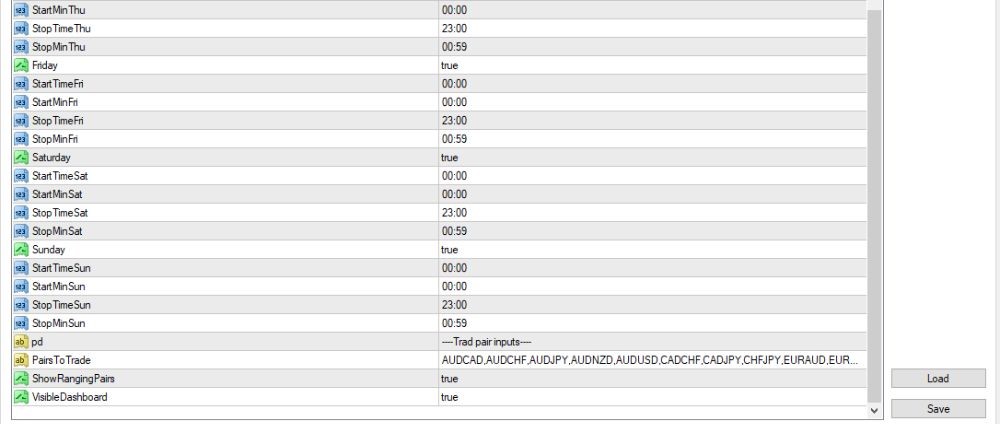
- Pairs to Trade:
The EA is configured to trade an extensive list of currency pairs, including:
AUDCAD, AUDCHF, AUDJPY, AUDNZD, AUDUSD, CADCHF, CADJPY, EURAUD, etc.
Interface & Visual Settings
- ShowVisualPanel: true – Shows the visual control panel on the chart.
- VisibleDashboard: true – Activates the dashboard interface for real-time monitoring.
- TextColor: White – Color of the text used in the panel.
- BackgroundColor: DarkSlateGray – Color of the panel/dashboard background.
- Font: Tahoma, Size: 14 – Font and size of all text shown.
- ShowRangingPairs: true – Displays currency pairs that are in a ranging (sideways) market condition.