









Blog
KING SNIPER EA MT4 – Full Input Settings Analysis


Buy KING SNIPER EA product here
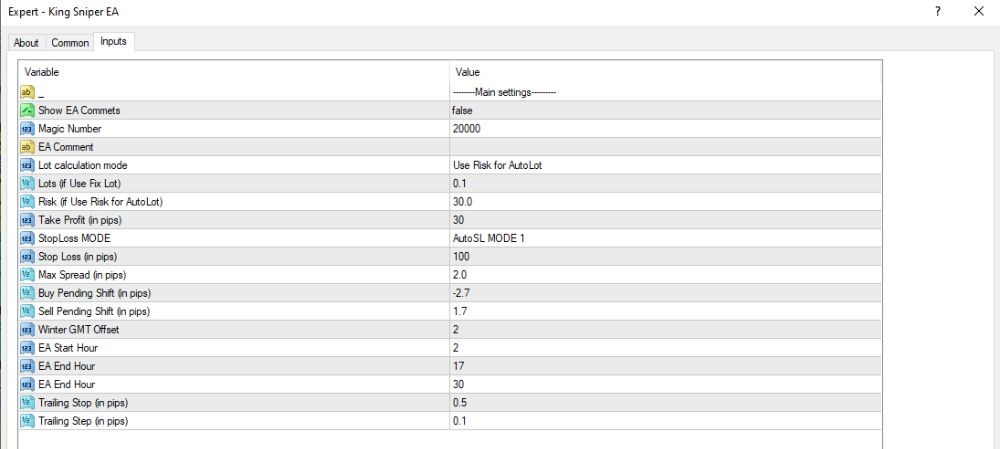
General configuration
- Show EA Comments – false
→ Do not display comments on the chart. - Magic Number – 20000
→ Unique EA number to avoid conflict with other Expert Advisors. - EA Comment – (empty)
→ Empty if no special order description needed.
Capital & Volume Management
- Lot Calculation Mode – Use Risk for AutoLot
→ EA calculates lot size based on risk percentage. - Lots (if Use Fixed Lot) – 0.1
→ If fixed lot mode, use 0.1 lots. - Risk (% for AutoLot) – 30.0
→ High risk: 30% of account per trade (very risky with small accounts).
Order management & trailing stops
- Take Profit (in pips) – 30
→ Use take profit of 30 pips. - Stop Loss Mode – AutoSL MODE 1
→ Stop loss automatically using internal algorithm. - Stop Loss (in pips) – 100
→ Max stop loss of 100 pips (used if AutoSL is off or doesn’t work). - Trailing Stop (in pips) – 30
→ Trailing stop activates when profit is 30 pips. - Trailing Step (in pips) – 0.1
→ Trailing stop will move by smooth 0.1 pip steps.
Time & Pending Command Translation
- Max Spread (in pips) – 2.0
→ Max allowed spread is 2 pips – very tight, ideal for low-spread pairs like EURUSD. - Buy Pending Shift (in pips) – 2.7
→ Place Buy Stop orders 2.7 pips above the last high. - Sell Pending Shift (in pips) – 1.7
→ Place Sell Stop orders 1.7 pips below the last low. - Winter GMT Offset – 0
→ Standard GMT time (no offset). - EA Start Hour – 1
→ EA starts trading at 01:00 server time. - EA End Hour – 10
→ EA stops trading at 10:00 – covers the Asian session (Tokyo).