









Blog
Mission Profit Fx EA MT4 – Full Input Settings Analysis


Buy Mission Profit Fx EA product here
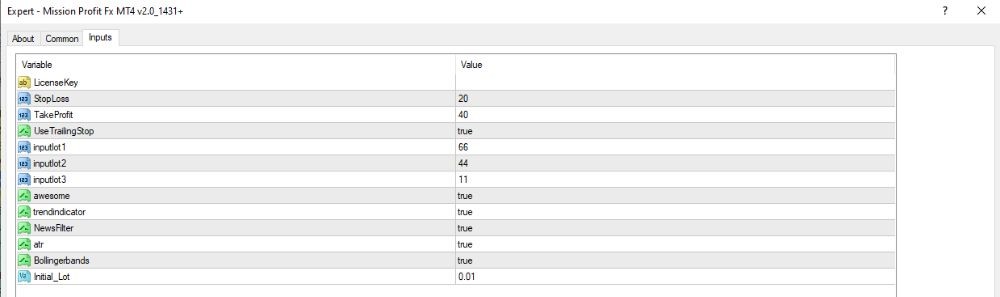
TP/SL Settings
- StopLoss: 20
Stops the trade at 20 points (2 pips on a 5-digit broker). - TakeProfit: 40
Takes profit at 40 points (i.e., 4 pips). - UseTrailingStop: true
Allows trailing stop so profits are locked as price moves in direction of trade.
Indicators In Use
- input1 / input2 / input3: 66 / 44 / 11
These are possibly time or coefficients for some indicators (exact use not specified). - awesome: true
Triggers Awesome Oscillator — to estimate market momentum. - trendindicator: true
Uses a trend indicator (most likely a Moving Average or so) to estimate market direction. - NewsFilter: true
Triggers news filtering — avoids trading during major news releases in order to reduce risk. - atr: true
Supports the ATR (Average True Range) indicator — measures market volatility. - Bollingerbands: true
Supports Bollinger Bands — helps to find overbought/oversold points or breakouts.
Key Takeaways
- Empowering Trader Success: Our aim is to enable traders to thrive in the market.
- Free Robot Access: Gain access to our advanced robot at no cost.
- Profit Sharing Model: Only pay a 5% share of your profits to us.
- Low Initial Investment: Begin trading with just $200 in your MT4 account.
- Proven Expertise: Benefit from our extensive experience; we’ve assisted over 25,000 traders in achieving impressive returns with minimal risk.
- Risk-Free Trial Offer: Register now for a risk-free trial of our robot, with payment required only upon profit realization.