









Blog
Top Bottom EA MT4 – Full Input Settings Analysis


Top Bottom EA is an automated trading robot tailored for MetaTrader 4, leveraging algorithms and strategic analysis to decipher real-time price charts for trading opportunities. Designed to autonomously manage trades from initiation to closure based on set logic and parameters, it eliminates the need for manual input. Optimized for small capital, this EA has a proven track record, actively trading with real funds for over four years.
Buy Top Bottom EA product here
Money Management & Lot Sizing
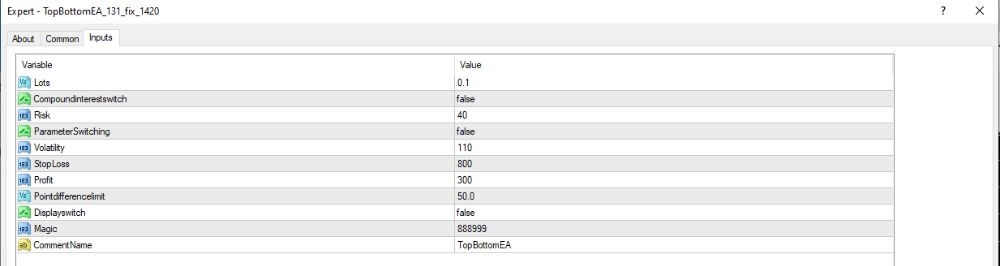
- Lots = 0.1 → 0.1 is a constant lot size for each transaction.
- CompoundInterestSwitch = false → Compounding is switched off, lot size is not proportional with account balance.
- Risk = 40 → Risk is defined as 40 (this may be a percentage or an internal EA value not precisely defined).
Order Management
- Stop Loss = 300 points (≈ 30 pips).
- Take Profit = 110 points (≈ 11 pips).
- PointDifferenceLimit = 50 → Probably the minimum trade distance apart or level of market movement before sending orders.
- Volatility = 110 → Volatility filter, probably used to identify top/bottom entry points.
Customization & Settings
- ParameterSwitching = false → Automatic parameter switching is disabled.
- DisplaySwitch = false → EA will not display data on the chart.
- Magic = 888899 → Unique identification for trades to prevent other EAs from colliding with them.
- CommentName = TopBottomEA → Comments on trades are labeled for simpler management and tracking.