









Blog
EA TOP G MT4 – Full Input Settings Analysis

EA TOP G is a multicurrency Expert Advisor (EA) that follows a trend strategy. It has a hedging system with a strong risk control and a revolutionary grid system with a soft martingale. It trades on 17 various forex pairs, offering very high portfolio diversification. Lot size and take-profit values are adjustable according to your account size and your own money management method to give adaptive control over trading profit as well as risk.
Buy EA TOP G product here
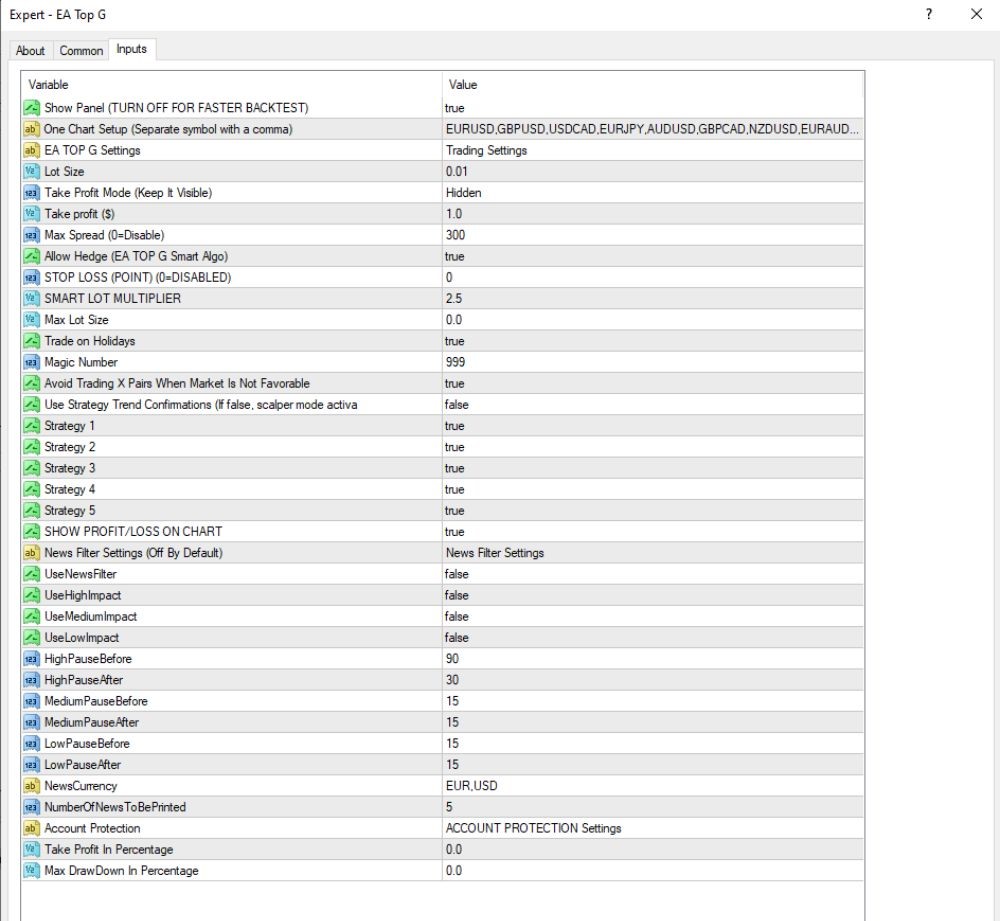
Trading Settings
News Filter Settings
- Use News Filter: false – News filtering is switched off.
- Use High Impact: false – There is no high-impact filtering of news.
- Use Medium Impact: false – Medium-impact news is not filtered.
- Use Low Impact: false – Low-impact news is not filtered.
- Pause times for news (pre/post event):
- HighImpact: 90 minutes before, 30 minutes after
- MediumImpact: 30 minutes before, 15 minutes after
- LowImpact: 15 minutes before, 15 minutes after
- News Currency: EUR, USD – These currencies are filtered by the news (if enabled).
- Number of News to Be Printed: 5 – Shows the previous 5 news events in the terminal.
Key Takeaways
- EA TOP G is a multi-currency trend Expert Advisor with a wonderful hedging system and good risk management capabilities.
- This EA buys and sells 17 forex pairs, achieving good diversification for your account portfolio.
- Users may personalize trading parameters, i.e., lot size and number of orders at a time.