









Blog
EVENING SCALPER PRO EA MT4 – Full Input Settings Analysis

Evening Scalper Pro EA is an advanced mean-reversion trading system for the American session. It is different from other scalping systems in that it utilizes cross pairs with good mean-reversion properties and tries to put high-profit targets. Between 19:00-23:00, it doesn’t trade when rollover (0:00-1:00) approaches and will close trades within a few hours. It employs sophisticated ways of determining exact entry and exit points, giving a high winning ratio with no martingale or grid system usage.
Buy EVENING SCALPER PRO EA product here
MM & Risk Settings
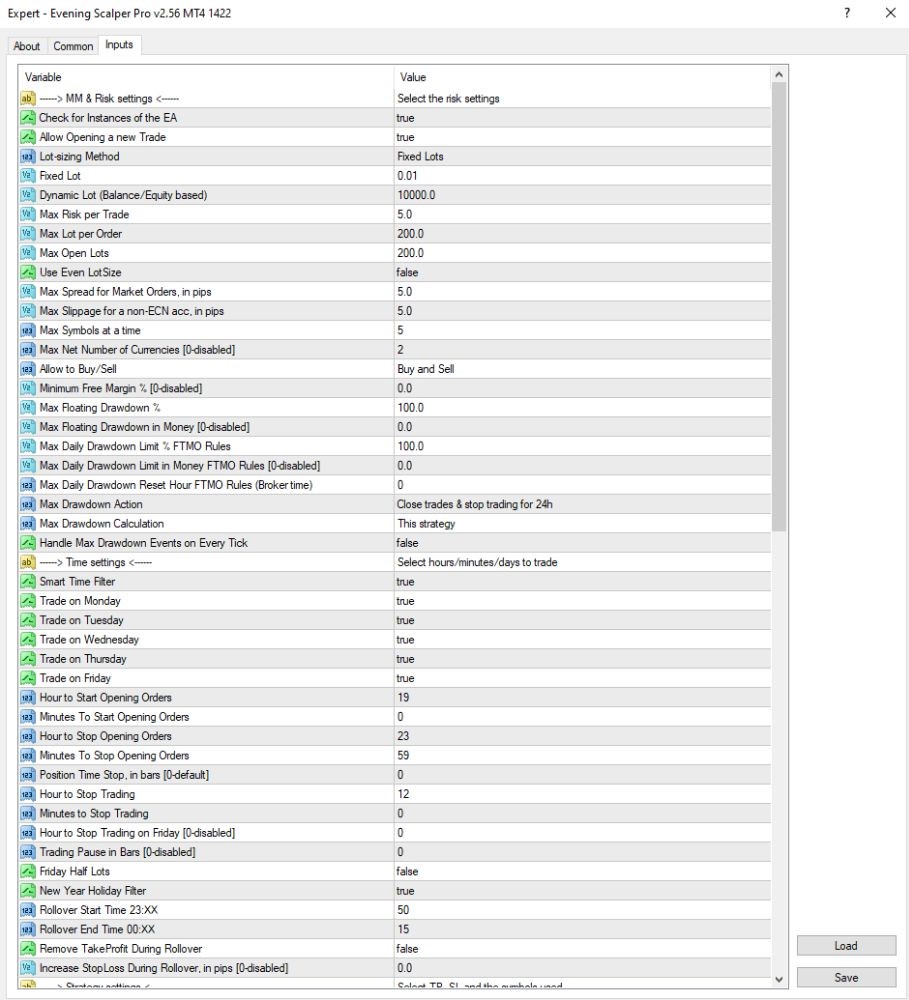
- Lot-sizing Method: Fixed Lots – Uses a fixed lot size.
- Fixed Lot: 0.01 – Extremely small fixed trade lot (suitable for small accounts).
- Max Risk per Trade: 5.0 – Max risk on each trade is 5% (high).
- Max Lot per Order: 200.0 – Extremely high lot limit per trade.
- Max Open Lots: 200.0 – Extremely high total open lot limit (unsuitable for small accounts).
- Minimum Free Margin %: 0.0 – No minimum margin is needed.
- Max Floating Drawdown %: 100.0 – Permits floating losses up to 100% of the account.
- Max Drawdown Action: Close trades & stop trading for 24h – Automatically closes trades and bars trading for 24 hours when max drawdown occurs.
Time Settings
- Monday → Friday trade: true – Performs trades from Monday to Friday.
- Hour to Start Opening Orders: 19 – Start opening at 19:00 terminal time.
- Hour to Stop Opening Orders: 23 – Do not open new orders at 23:00.
- Hour to Stay Away: 12 – Stay away from trading at 12:00 (typically to close pending trades).
Trade & Order Settings
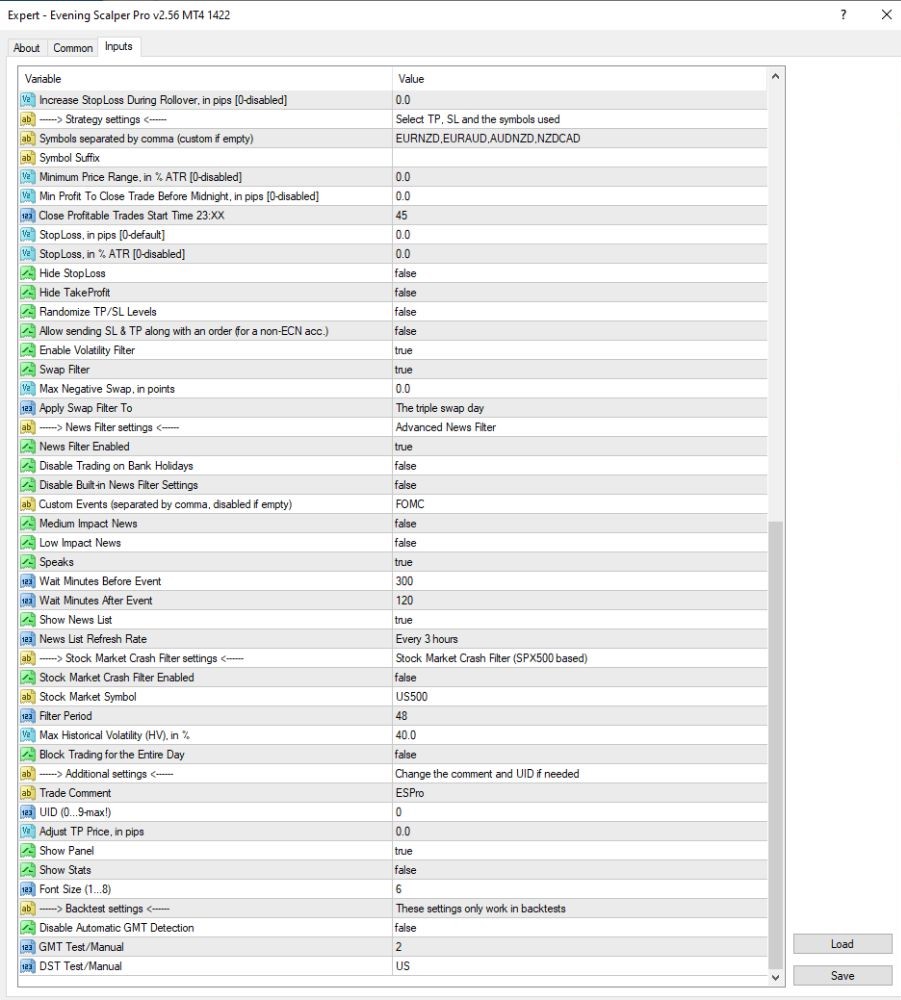
- Max Slippage ECN & non-ECN: 5.0 – Maximum allowable slippage.
- Max Spread on Market Orders: 5.0 – The maximum spread for market entries.
- Symbol List: EURNZD, EURAUD, AUDNZD, NZDCAD – Currencies exchanged.
- StopLoss, TakeProfit (pips): 0.0 – No strategy-specific SL/TP utilized (strategy-based exits used instead).
- Min Profit to Close Trade Before Midnight: 0.0 – No profit-taking before midnight.
- Hide TakeProfit, StopLoss: false – TP/SL are not hidden from broker.
Transaction Filter & Safety
- Enable Volatility Filter: true – to activate market volatility filter.
- News Filter Enabled: true – Enables news filter (extremely helpful for scalping EAs).
- Disable Trading on Bank Holidays: false – allows trading even for bank holidays.
- Custom Events (exclusives): FOMC – FOMC (Federal Reserve) event filters.
- High/Medium/Low Impact News: false – These levels of impact’s filters are off.
- Stock Market Crash Filter Activated: false – Crash event filter is disabled.