









Blog
GREEZLY BOT PRO EA MT4 – Full Input Settings Analysis

Greezly Bot Pro EA is a trading robot that has been coded to directly use within the forex market. Using grid and martingale, it analyzes prices of assets on several different timeframes to determine the general trend direction. Greezly Bot Pro EA is a newer, optimized version of the EA Thomas advisor with a better strategy for trading. It runs seamlessly on the MetaTrader 4 platform and automatically places trades without any human intervention. While it would function best on the EURUSD currency pair, settings can be adjusted to fit other instruments as well.
Buy GREEZLY BOT PRO EA product here
Trading Strategy – Martingale
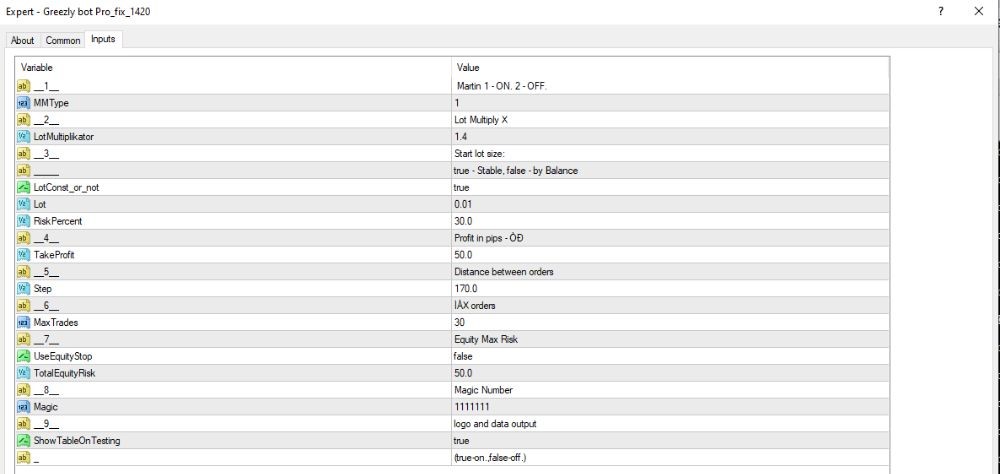
- Initial Trade Volume: The starting order starts with a lot size of 0.01.
- Lot Scaling: On each lost trade, the lot size of the subsequent trade is multiplied by a factor of 1.4, repeatedly until the maximum is reached.
- Trade Spacing (Step): The subsequent trade is opened 170 pips away from the other for each subsequent trade.
- Maximum Trades: The EA can open a total of 30 trades consecutively.
- Take Profit: All positions are closed with a profit target of 50 pips.
Capital and Risk Management
- Fixed Lot Size Enabled: true
→Lot size is not based on account balance or risk percentage, fixed instead. - Auto Lot Option: On, you can specify a Risk Percent (e.g. 30%), the lot size is calculated with regard to equity available then.
- Equity Stop Protection:
One worldwide Equity Stop at 50% of account value.
→Protective net from total loss of the account (account “burnout”). - No Individual Stop Loss (SL):
→ No stop loss on every single trade. Take Profit (TP) and global Equity Stop are employed for risk protection by the EA.
Technical Setup & Magic
- Magic Number: 111111
→ Distinctive trade name to avoid interference or confusion with any other EAs. - ShowTableOnTesting: true
→ Displays a statistics table during strategy tests in the terminal. - User Interface
→ The control panel is easy to use and intuitive, with settings easy to control and manage.