









Blog
GTX SCALPER EA MT4 – Full Input Settings Analysis

GTX Scalper EA is a computerized trading adviser that trades the EURUSD currency pair. It makes use of advanced algorithms in order to optimize trading performance and minimize risk to provide smooth output. The EA has a news filter and trading time filter so that the trader can manage the robot’s response to news and discretionary trading time. Specifically tailored for the volatility of the Forex market, GTX Scalper EA features an easy-to-use interface and sophisticated algorithmic properties to give traders that extra advantage.
Buy GTX SCALPER EA product here
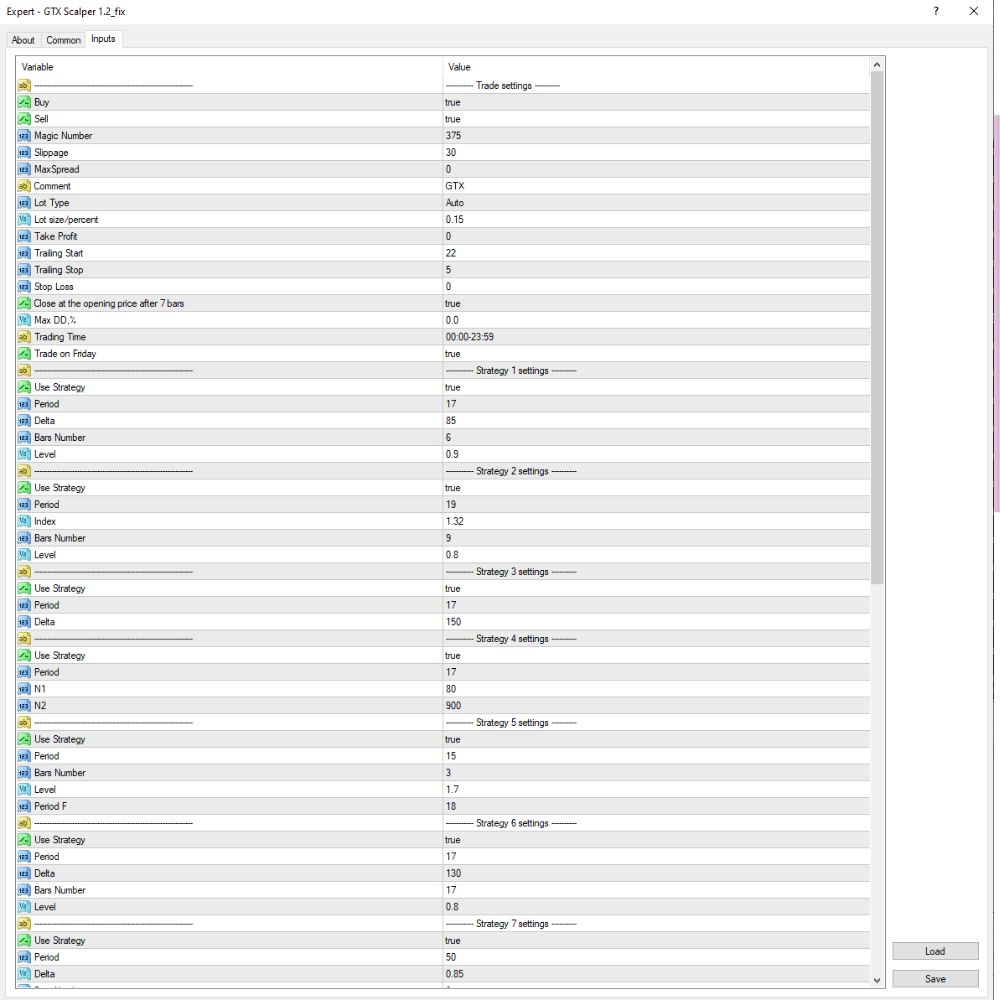
Trade Settings
- Buy / Sell: true
→ Allows buy and sell (two-way) trading. - Magic Number: 375
→ Unique identification number for trades of this EA so others will not interfere. - Slippage: 30
→ Maximum slippage allowed: 30 pips. - Max Spread: 0
→ Can be read as no max spread, or needs additional explanation by broker or EA instructions. - Lot Type: Auto
→ Automatically calculates lot size from account balance. - Lot Size Percentage: 0.15
→ Lot size is 0.15% of account equity. - Take Profit: 22 pips
→ Each trade will target 22 pips of profit. - Trailing Stop: 5 pips
→ Stop Loss will trail the price by 5 pips upon activation. - Trailing Start: 2 pips
→ Trailing Stop will activate if a trade has generated at least 2 pips. - Stop Loss: 0.0
→ Might be an extremely large stop or that no Stop Loss is employed. - Max Drawdown (%): 10.0
→ EA will close when account drawdown is 10%. - Trading Time: 00:00–23:59
→ EA makes trades throughout the entire day. - Friday trade: true
→ Friday trade is allowed.
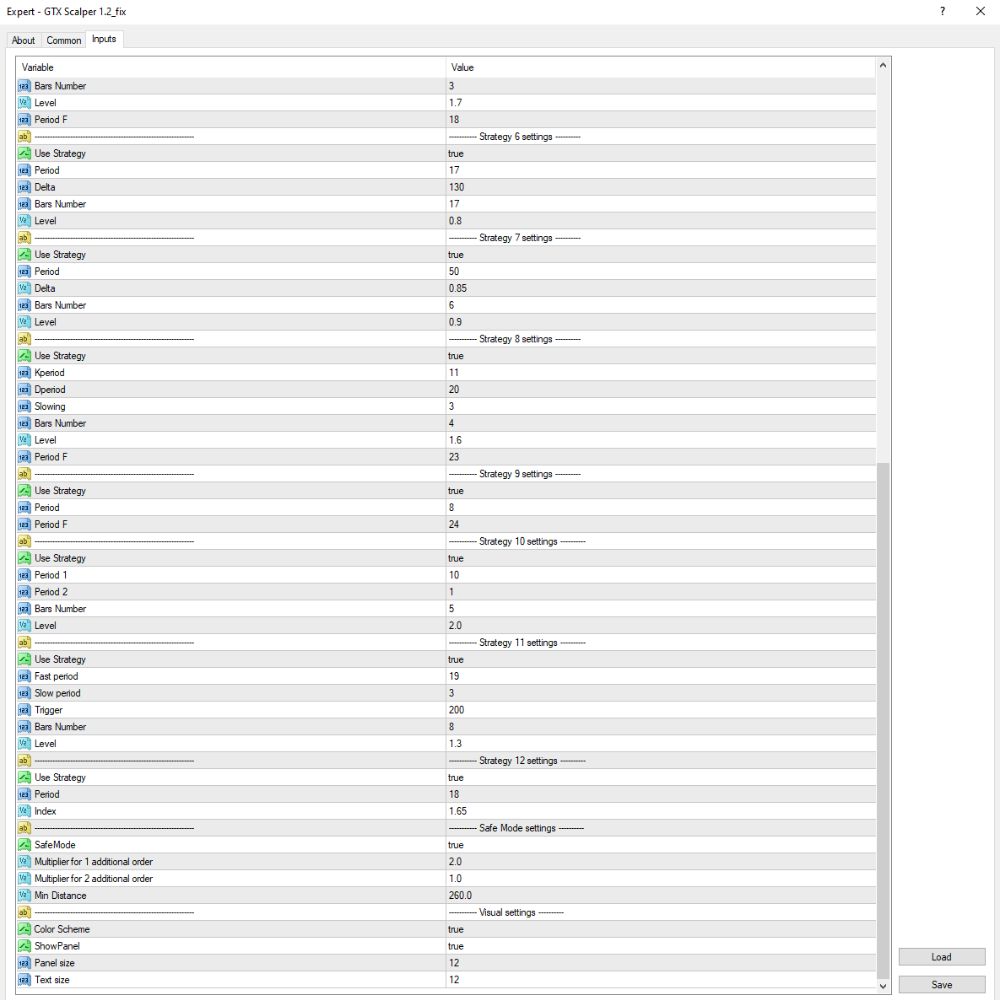
Technical strategy system
- Use Strategy
→ Turn on or off this specific trading strategy. - Period
→ Calculation interval for the indicator (e.g., EMA, RSI). - Delta / Index / Trigger
→ Entry trigger or trigger value based on the condition of the strategy. - Bars Number
→ Number of bars (candles) to calculate the indicator. - Level
→ Strength of condition signal used to define entry conditions.
Safe Mode & Interface
- SafeMode: true
→ Enables Safe Mode to prevent further order entry under controlled conditions. - Multiplier for 1st Additional Order: 2.0
→ First additional trade size is doubled (2 times the original order). - Multiplier for 2nd Additional Order: 1.0
→ Second additional trade size is the same as the previous one (no multiplication). - Minimum Distance Between Orders: 260.0 pips
→ Minimum distance between each additional trade to prevent overtrading risk.
Key Takeaways
- Smart Loss Closing System: Applies sophisticated algorithms to close losing trades in a smart way, thereby efficiently managing and limiting risk.
- News Filter and Trading Time Filter: Provides advanced filtering features to maximize trading strategies by managing the influence of news events and specific times of trade.
- News Filter Test Capability: Offers the ability to test the efficiency of the news filter in a simulated environment, ensuring effective performance prior to actual deployment.