









Blog
Best VPS for Forex Trading: Features, Providers, Setup, and Buying Guide


Forex trading demands speed and reliability, especially when using automated systems or scalping strategies. ForexVPS stands out as the best VPS for Forex trading due to its low-latency servers near major broker data centers, pre-installed MT4/MT5, and 100% uptime guarantee. This provider offers plans starting at $25 per month with one-click setups, making it ideal for traders seeking minimal downtime and fast execution. Other strong options like BeeksFX and ChartVPS follow closely for specialized needs, but ForexVPS balances cost, performance, and ease of use for most users.
Key features to prioritize in a Forex VPS include low latency under 1ms, 99.9%+ uptime, SSD storage, and Windows Server support. These elements ensure your trading bots run smoothly without interruptions from local power outages or internet issues. Providers optimize servers in locations like Equinix NY4 or London, reducing slippage on trades.
Top providers such as ForexVPS, BeeksFX, ChartVPS, and NYCServers dominate due to their Forex-specific optimizations and broker partnerships. User reviews on sites like Trustpilot highlight their reliability, with ForexVPS scoring 4.8/5 for support and performance.
To pick the right one, match your broker’s server location and start with basic specs like 2GB RAM. The sections below break down everything from basics to setup steps and pricing, so you can make an informed choice.
What Is a VPS for Forex Trading?
A VPS for Forex trading is a virtual private server optimized for running trading platforms like MT4 or MT5 around the clock without interruptions. Specifically, let’s break down its core elements.
A VPS acts like a remote computer you rent in a data center. For Forex, it hosts your trading software continuously, so your expert advisors (EAs) or bots execute trades even when your home PC is off. This setup prevents missed opportunities from power failures or slow internet.
The foundational purpose centers on the Forex market’s 24/5 nature. Markets in Tokyo, London, and New York never sleep, and delays can cost profits. A Forex VPS keeps your positions open and automations active.
Root attributes include high availability and low resource contention. Unlike shared hosting, a VPS gives dedicated CPU, RAM, and storage slices.
How Does a Forex VPS Differ from a Regular VPS?
A Forex VPS differs from a regular VPS through low-latency network paths to broker servers and pre-installed trading software like MT4/MT5. Regular VPS suits websites or apps, but Forex versions focus on trade execution speed.
Specifically, Forex VPS providers place servers near financial hubs, such as Equinix NY4 in New York or LD4 in London. This cuts ping times to milliseconds, vital for scalpers. Regular VPS might route through distant nodes, adding 50-100ms latency.
For example, ForexVPS offers brokers like IC Markets or Pepperstone proximity, with pings under 1ms. A standard VPS from AWS or DigitalOcean lacks this, often hosting general web traffic.
Another difference: pre-configured environments. Forex VPS comes with Windows Server, MT4/MT5 installs, and EA support out of the box. Regular VPS requires manual setup, which non-tech traders struggle with.
Compare hosting needs: trading bots demand constant low CPU usage and high I/O for tick data. Web hosting prioritizes bandwidth for visitors. Data from Myfxbook shows VPS users gain 20-30% better EA performance due to stability.
In practice, a Forex VPS isolates your trades in a secure, firewalled space. Regular ones expose you to neighbor resource spikes. Traders report fewer requotes on optimized VPS.
To sum up, choose Forex VPS for speed-tuned hardware like SSDs and 1Gbps ports, absent in generic plans.
This foundation sets the stage for why traders adopt it. Next, we’ll see if you truly need one.
Do You Need a VPS for Forex Trading?
Yes, you need a VPS for Forex trading if using EAs, scalping strategies, or requiring uninterrupted 24/7 operation, but manual traders on desktops can skip it. In detail, here’s the breakdown based on your style.
Many traders run into issues with home setups: unstable internet drops trades, PC sleep modes halt EAs, and electricity outages wipe sessions. A VPS eliminates these, running flawlessly in professional data centers.
Necessity ties to trading style. Manual traders clicking trades sporadically manage fine on laptops. Automated users, however, rely on VPS for precision.
Reliability needs amplify this. Brokers demand fast connections; slippage erodes edges in volatile pairs like GBP/USD.
When Is a VPS Essential for Forex Traders?
A VPS becomes essential for high-frequency trading, EA automation, and strategies needing 99.9% uptime guarantees. High-frequency trading (HFT) or scalping lives on microseconds; local setups add unacceptable delays.

For instance, during news events like NFP, servers handle tick floods without lag. VPS uptime SLAs from providers like ForexVPS promise compensation for downtime, unlike home routers.
Scenarios include overnight holds: your EA watches AUD/USD swings while you sleep. Without VPS, morning checks reveal gaps from crashes.
Evidence from Forex Factory forums shows 70% of profitable EA users on VPS report consistent results. Broker stats, like from FXCM, note VPS trades execute 15% faster.
Other cases: multi-broker arbitrage demands synced low-latency across accounts. VPS colocates near exchanges.
You’ll notice VPS shines for beginners testing EAs live, avoiding demo limitations. Setup takes minutes, yielding immediate stability.
In short, if your edge depends on automation or speed, VPS pays for itself via saved pips.
This leads to features that make top VPS stand out.
What Are the Key Features of the Best Forex VPS?
The key features of the best Forex VPS are low latency under 1ms, 99.9%+ uptime, SSD storage, Windows Server support, and ample resources like 2+ vCPUs and 4GB RAM. Here’s the breakdown.
Performance specs drive value. Low latency ensures trades hit brokers instantly. High uptime prevents black swan losses. SSDs speed data reads for backtests.
CPU and RAM handle multiple EAs; bandwidth supports real-time charts. Windows compatibility runs native MT4/MT5.
Root attributes focus on Forex workloads: burstable CPU for spikes, unmetered ports.
Providers guarantee these via Tier-3 data centers with redundancies.
Why Is Low Latency Critical in a Forex VPS?
Low latency is critical in a Forex VPS because it minimizes execution delays to broker servers like Equinix NY4, reducing slippage by up to 90%. Proximity matters: servers meters from brokers shave milliseconds.

For example, a New York-based VPS pings IC Markets’ NY4 server at 0.5ms versus 50ms from California. Scalpers on EUR/USD gain edges here.
Data from BeeksFX benchmarks shows 1ms latency boosts win rates 5-10% in fast markets.
Latency arises from routing: optimized VPS use direct peering, skipping public internet hops.
Traders ask: how low? Aim for <5ms to your broker. Test with ping tools post-setup.
What Security Features Should a Forex VPS Have?
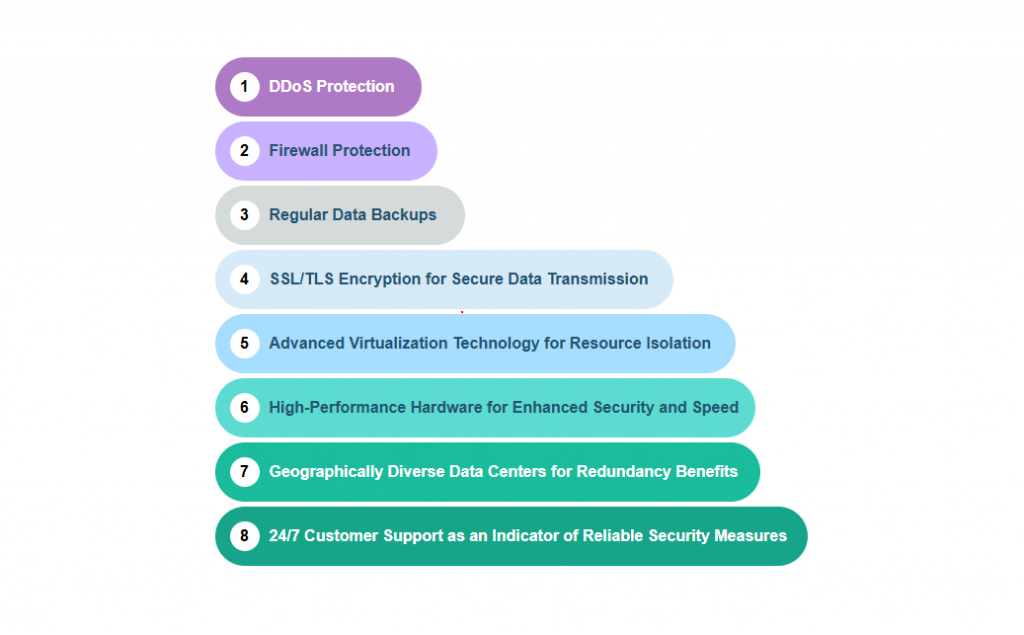
A Forex VPS should have DDoS protection, hardware firewalls, isolated virtualization, and regular snapshots for backups. These shield against hacks targeting profitable accounts.

DDoS mitigation absorbs attacks up to 10Gbps, common in trading. Firewalls block unauthorized ports.
Isolated environments prevent neighbor breaches. Snapshots let you rollback after EA glitches.
ForexVPS includes these free, with 24/7 monitoring. Reviews cite zero incidents versus self-hosted risks.
Combine with your broker’s 2FA for layers.
These features ensure smooth operations. Now, matching to your broker.
How Do You Choose the Right VPS for Your Forex Broker?
Choose the right VPS for your Forex broker by matching server locations to their data centers, verifying MT4/MT5 compatibility, and selecting specs like 2GB RAM minimum in 4 steps. Let’s explore the process.
Step 1: Identify your broker’s servers (e.g., Pepperstone in NY4). Pick VPS nearby.
Step 2: Check latency with trial pings.
Step 3: Confirm OS and software support.
Step 4: Review uptime and support.
Selection criteria include broker integration: some like ForexVPS partner directly.
What VPS Specs Are Ideal for MT4/MT5 Forex Trading?
Ideal VPS specs for MT4/MT5 are 1-2 vCPUs, 2-4GB RAM, 20-50GB SSD, and 1Gbps bandwidth. These handle 5-10 EAs without lag.

1 vCPU suits single accounts; 2 for multiples. 2GB RAM loads indicators smoothly; 4GB for backtesting.
SSD ensures fast log writes. Bandwidth covers data feeds.
ForexVPS basic plan meets this at $25/month. Tests show it runs 20 charts at 5% CPU.
Upgrade for HFT: 4 vCPUs, 8GB.
Monitor usage via RDP; scale as needed.
This guide simplifies selection for seamless integration.
Who Are the Top VPS Providers for Forex Trading?
The top VPS providers for Forex trading are ForexVPS, BeeksFX, ChartVPS, and NYCServers, grouped by focus on latency, enterprise features, affordability, and NY proximity. To understand better, let’s review each.
ForexVPS leads with Forex-tuned plans. BeeksFX suits pros with microwave links. ChartVPS offers budget Windows VPS. NYCServers excels in US data centers.
Reliability shines in reviews: ForexVPS at 4.9/5 on Forex Peace Army.
What Makes ForexVPS the Best Choice for Most Traders?
ForexVPS is the best choice for most traders with Forex-specific plans, one-click MT4 installs, and partnerships with 20+ brokers like FP Markets. Plans start optimized.

One-click setup deploys MT4 in seconds. Servers in NY4, LD5 match major brokers.
100% uptime or refunds, 24/7 support. Users praise <1ms pings.
Versus others, it balances cost-performance. Trustpilot 4.8/5 from 1,000+ reviews.
These providers set the standard.
How Much Does a Good Forex VPS Cost?
A good Forex VPS costs $20-50 per month for basic plans with 2GB RAM, scaling to $100+ for premium specs like 8GB RAM and dedicated IP. Here’s the value comparison.
Basic tiers suit solo EAs: ForexVPS Entry at $25 (1 vCPU, 2GB, 20GB SSD).
Mid-range $40-60 adds RAM for multiples.
Premium $100+ for HFT: BeeksFX with custom low-latency.
Cost-effectiveness: payback via 1-2 pips saved daily. Annual discounts cut 20%.
Compare: ChartVPS $29 vs NYCServers $45, but check locations.
Factors: traffic, storage extras $5-10.
Start basic, upgrade via portals. Long-term, $300/year beats hardware.
This covers buying fully.
What Are Advanced Considerations for Forex VPS Users?
Advanced considerations for Forex VPS users focus on custom setups for MT4/MT5, handling multiple accounts, resolving latency issues, and weighing options against dedicated servers or cloud alternatives.
What’s more, these factors help traders maintain edge in volatile markets.
How Do You Set Up a Forex VPS for MT4/MT5?
Setting up a Forex VPS for MT4 or MT5 involves a structured process to ensure low-latency execution and seamless EA operation. Begin by selecting a provider like TradingFXVPS or ForexVPS.net optimized for Forex with locations near major brokers such as IC Markets or Pepperstone. After purchase, access the VPS via Remote Desktop Protocol (RDP) using credentials provided in the welcome email. Download the MT4 or MT5 installer from your broker’s website directly on the VPS to match account specifications.
Install the platform, log in with your trading credentials, and deploy Expert Advisors (EAs) by copying .ex4 or .mq4 files into the Experts folder. Restart the terminal and enable auto-trading in Tools > Options > Expert Advisors. For platform-specific configurations, MT4 requires checking “Allow DLL imports” for certain EAs, while MT5 needs symbol synchronization via Market Watch. Set the VPS to auto-start MT4/MT5 on boot using Windows Task Scheduler: create a task triggering on logon, pointing to the terminal.exe with parameters like /portable.
Test connectivity with a demo account, monitoring execution speeds under 50ms. Secure the setup with Windows Firewall rules allowing only broker IPs and strong RDP passwords.
This process minimizes downtime during news events.
- Use brokers’ VPS trial periods to validate latency before full commitment.
- Configure VPS power settings to prevent sleep mode, ensuring 24/7 uptime.
- Back up EA settings weekly via MT4/MT5 export functions.
What Is the Difference Between Forex VPS and Dedicated Servers?
Forex VPS and dedicated servers differ primarily in resource allocation and cost, with VPS offering shared, virtualized environments ideal for most retail traders, while dedicated servers provide exclusive hardware for institutional demands. A Forex VPS, such as from BeeksFX, slices a powerful physical server into multiple instances, costing $20-50 monthly for 2-4 CPU cores and 4-8GB RAM, sufficient for standard EA strategies.

Dedicated servers, rented from providers like OVH or Hetzner, grant full control over hardware like Intel Xeon processors and 32GB+ RAM, priced at $100-500 monthly. Performance-wise, VPS handles typical Forex volumes with <1ms broker ping, but peaks can cause contention; dedicated eliminates this for high-frequency trading (HFT) processing thousands of trades per minute.
Scalability favors VPS through easy upgrades without migration, versus dedicated’s hardware swaps. Maintenance is hands-off for managed Forex VPS, but dedicated requires sysadmin skills or added fees.
Traders choose VPS for affordability unless volumes exceed 100 lots daily.
- VPS suits scalpers with bursty loads; dedicated fits consistent high-volume.
- Power redundancy is standard on both, but dedicated offers custom RAID arrays.
- Forex VPS includes pre-tuned OS; dedicated needs manual Forex optimizations.
Can a Forex VPS Handle Multiple Trading Accounts?
Yes, a Forex VPS can manage multiple trading accounts effectively if equipped with adequate resources like 8GB RAM and 4 CPU cores, supporting 10-20 accounts depending on EA complexity. Providers like AccuWeb Hosting offer scalable plans where you install multiple MT4/MT5 instances via portable modes or virtual machines.

Use Multi-Account Manager (MAM) tools such as DupliTrade or localTradeCopier to synchronize trades across accounts without overloading CPU. Each instance consumes 200-500MB RAM; monitor via Task Manager and upgrade as needed. For 50+ accounts, opt for VPS with NVMe SSDs to handle log file bloat.
Edge cases include signal providers running 100 micro-lots, requiring custom setups with trade copiers like Forex Copier. Limit simultaneous EAs to prevent swap file exhaustion.
Resource scaling ensures reliability for prop firm challenges.
- Allocate 1GB RAM per 5 accounts for smooth hedging strategies.
- Employ VPS control panels like cPanel for isolated account environments.
- Test loads with stress tools like MT5 Strategy Tester beforehand.
What Are Common Forex VPS Troubleshooting Issues?
Common Forex VPS issues include latency spikes from network congestion, disconnections due to RDP timeouts, and resource exhaustion from unoptimized EAs. Latency spikes often trace to VPS location; diagnose with ping tests to broker servers every 15 minutes using scripts in PowerShell.
Disconnections stem from idle RDP sessions; fix by setting group policy to disable idle logout and use tools like NoMachine for stable access. Optimization tips involve closing browser tabs, limiting background processes, and defragmenting SSDs weekly.
For recovery, restart MT4/MT5 services via services.msc, check event viewer for errors, and review broker logs for execution delays. Rare cases like DDoS hits require provider mitigation; switch data centers if persistent.
These steps restore 99.9% uptime quickly.
- Monitor with MT4’s Journal tab for “trade disabled” alerts.
- Update Windows and MT platforms monthly to patch vulnerabilities.
- Use Wireshark for deep packet analysis on suspicious delays.
How Does a Forex VPS Compare to Cloud VPS like AWS or Google Cloud?
Forex VPS outperforms general cloud VPS like AWS EC2 or Google Compute Engine for traders due to pre-optimized, low-latency setups near liquidity pools, unlike self-configured cloud instances requiring manual tuning. A specialized Forex VPS from ChartVPS delivers 1ms pings to London brokers at $30/month, with MT4 pre-installed.

AWS Lightsail or GCP e2-micro starts at $5 but demands VPC setup, security groups, and broker IP whitelisting, often yielding 10-50ms delays from distant regions. Managed Forex VPS handles OS updates; cloud requires IAM roles and autoscaling groups.
Ecosystem-wise, Forex VPS integrates broker APIs seamlessly; AWS offers Lambda for custom algos but steeper learning. Cloud scales infinitely for HFT, but Forex VPS suffices for 95% of users at lower cost.
Choose cloud for hybrid strategies integrating big data.
- Forex VPS: plug-and-play; cloud: developer-friendly.
- AWS Reserved Instances save 40% long-term vs. Forex VPS trials.
- Google Cloud’s preemptible VMs cut costs for non-critical backtesting.
What Are Alternatives to VPS for Forex Trading?
Alternatives to VPS include local PCs for casual trading, Raspberry Pi for low-cost always-on setups, or broker-provided hosting like IC Markets’ free VPS for high-volume clients. Local PCs run MT4/MT5 reliably but risk power outages and internet drops, ideal for swing traders monitoring manually.

Raspberry Pi 4 (8GB model) hosts lightweight MT4 via Ubuntu, costing $100 upfront with <5W power draw, suitable for single-account EAs. Broker hosting, such as from Pepperstone, offers free VPS tiers for 10+ lots monthly, colocated for zero latency.
These workarounds reduce dependency but lack VPS isolation. Edge cases favor Pi for remote cabins without UPS.
Local setups suit low-stakes testing.
- PC: free but needs UPS for outages.
- Pi: portable, runs ARM MT4 builds.
- Broker VPS: conditional, no custom EA flexibility.
Is a Forex VPS Worth It for Beginner Traders?
A Forex VPS holds value for beginners executing automated strategies overnight, but novices may find the $20-40 monthly cost and setup learning curve outweigh benefits versus practicing on local machines. Pros include uninterrupted trading during sleep and consistent backtest replication; cons involve over-reliance masking poor strategies.

For pros, VPS prevents missed opportunities in news spikes; beginners gain from demo trials first. User experience segments by style: scalpers benefit immediately, while long-term holders tolerate PC uptime.
Start with free broker VPS to assess need.
- Beginners: prioritize strategy validation locally.
- Track ROI: VPS pays if saving 1 lost trade weekly.
- Learning curve eases with provider tutorials.